
How to Close an Audio Fix With Proof Saved
 By HenrikUpdated Aug 7, 20266 min read
Organize the source file, final copy, old version, test evidence, and archive notes before closing an audio fix.

Audio fixes often leave a trail of working copies: original, broken public file, trimmed evidence, temporary workaround, compressed test copy, final export, and the file that actually went live.
If those files stay mixed together, the next person may reopen the same issue or publish the wrong copy later.
An audio fix closeout folder turns the repair into a clean record.
Decide What Belongs in Closeout
The closeout folder should help a future teammate understand the repair without reopening the whole thread.
| File or note | Keep in closeout? | Label it as | Reason |
|---|---|---|---|
| Approved final copy | Yes | final-public or final-review | This is the trusted output |
| Original source | Yes, when available | source-do-not-edit | It explains where the fix came from |
| Broken old copy | Usually yes | old-public or retired | It supports rollback and comparison |
| Temporary workaround | Only if users saw it | temporary-retired | It prevents accidental reuse |
| Random draft exports | No | remove from active package | They make the folder harder to trust |
Decide What the File Must Prove
| Decision point | Tool | Evidence to collect |
|---|---|---|
| 1 | Audio Metadata Viewer | Identify source, broken, temporary, final, and public copies before filing them. |
| 2 | Recording Quality Checker | Mark which copies are usable, broken, temporary, or final. |
| 3 | Audio Waveform Generator | Keep one visual clue when timing, silence, or missing endings caused the issue. |
| 4 | Audio File Size Calculator | Record storage and delivery size when source and public copies differ. |
| 5 | Audio Metadata Editor | Add safe status labels so future users do not reuse the wrong file. |
| 6 | Audio Compressor | Create a smaller archive or sharing copy only after the final version is clear. |
Closeout is about future clarity. It should make the next review faster.
Step 1: Separate the File Roles
Create clear groups:
01-source
02-reported-public-copy
03-evidence
04-workaround
05-final-approved
06-rollout-proof
You do not need every folder every time. Use only the groups that match the fix.
Add a Closeout Manifest
Create one small text note that names the trusted files. This is faster than asking future reviewers to inspect every folder.
closeout manifest:
source file:
old public copy:
temporary workaround:
final approved copy:
public rollout proof:
rollback status:
customer follow-up:
owner:
next review:
The manifest should make it obvious which file can be reused and which files are evidence only.
Step 2: Confirm Identity Before Filing
Use Audio Metadata Viewer before moving or renaming files.
Record:
- File role.
- Duration.
- Format.
- Size.
- Source clues.
- Page or support case.
- Owner.
- Approval status.
Do not file two different copies under the same “final” name.
Step 3: Mark the Final Copy
Use Recording Quality Checker on the final approved file.
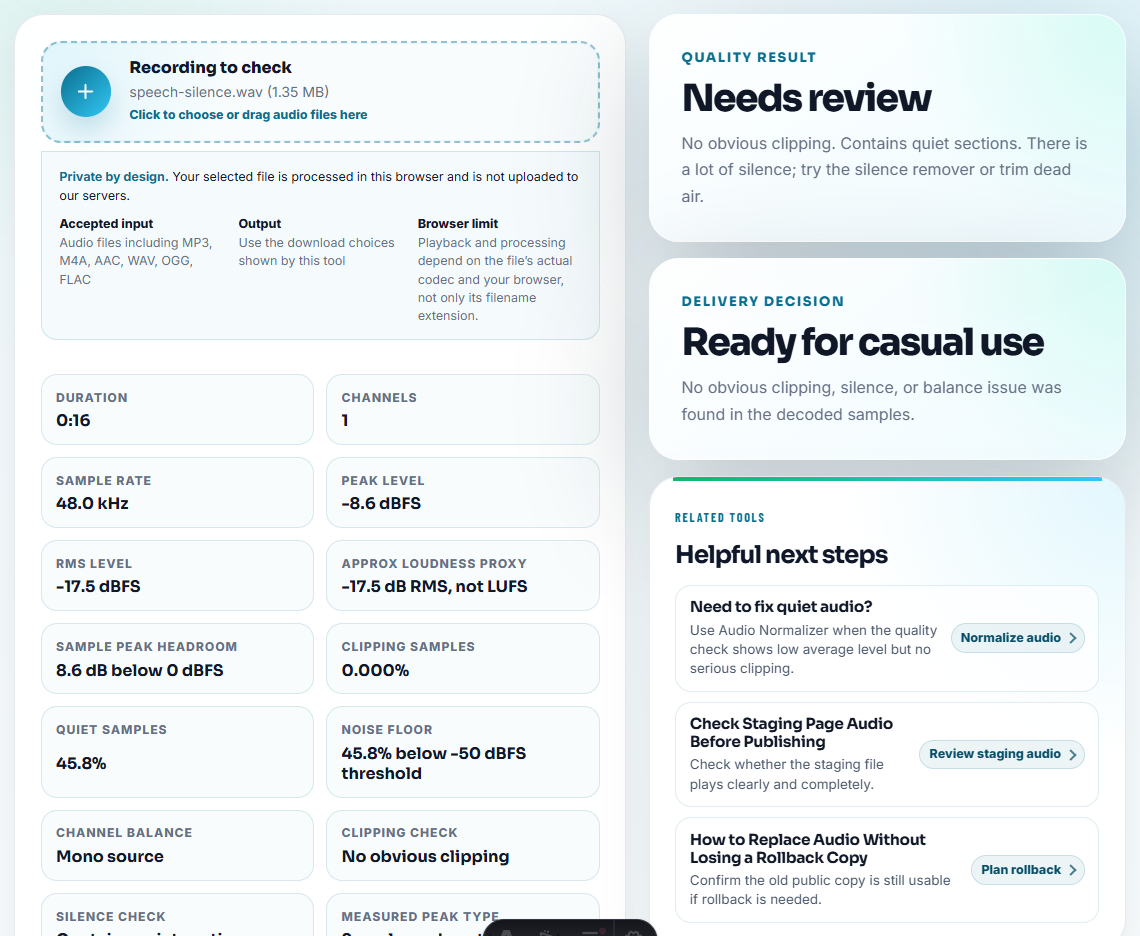
Confirm:
- It is audible.
- It is complete.
- The repaired moment is present.
- It is not the temporary workaround unless that was formally approved.
- It matches the public link or customer reply.
Then label it plainly:
final-approved-public-copyStep 4: Keep Evidence Without Keeping Chaos
Evidence can be:
- A short reproduction clip.
- A waveform image.
- Old public copy details.
- Screenshot or note of the public link.
- Metadata comparison.
- Post-rollout proof.
Keep only what explains the fix. Do not keep every failed export beside the final copy.
Decide What to Archive, Retire, or Delete
Closeout is also a cleanup decision. Keep enough proof, but do not preserve confusion in the active folder.
| Item | Action | Reason |
|---|---|---|
| Trusted source | Archive or keep protected | Needed for future replacements |
| Final public copy | Keep active and labeled | This is the current approved file |
| Old public copy | Archive or retire with rollback note | Needed for comparison or emergency restore |
| Temporary workaround | Retire after final fix is accepted | Prevents accidental reuse |
| Failed exports | Delete or move out of active package | They create false “final” candidates |
| Evidence clip or waveform | Keep one useful proof item | Explains the issue without keeping every draft |
This keeps the folder useful for the next maintenance pass.
Step 5: Add Rollback or Retirement Notes
Use a short closeout note:
old public copy: retired
rollback: not allowed
reason: missing final section
replacement: demo-v2-approved.mp3
post-rollout proof: checked from public page
If rollback is allowed, state where the old copy is stored and how long it should stay.
Step 6: Label Files Safely
Use Audio Metadata Editor only for safe internal labels:
Fixed public copy. Approved source. Rolled out 2026-07-31. Owner: support.Avoid customer names, account IDs, private case text, blame language, and long internal notes inside shared metadata.
Closeout Folder Checklist
- Source file identified.
- Broken or old public copy labeled.
- Evidence kept in one place.
- Final approved copy marked.
- Public rollout proof recorded.
- Rollback or retirement status clear.
- Metadata safe.
- Owner and next review captured.
What Can Go Wrong When You Close an Audio Fix With Proof Saved
- Do not leave temporary copies beside final copies without labels.
- Do not delete the old public copy without a note if rollback matters.
- Do not keep every failed export forever.
- Do not use “final” for more than one file.
- Do not bury evidence in chat screenshots only.
- Do not put private customer details into shared audio metadata.
When Browser Prep Is Enough for Fix Closeout
Browser prep is enough for a closeout folder when the team needs tidy evidence, not a new production asset. Keep raw, fixed, and final-review files in separate folders, and include a short note explaining which clip proves the fix.
Use formal asset management when you need permissions, audit trails, legal retention, automated checksums, or many people editing the same library.
Next Audio Checks to Try
- Audio Metadata Viewer
- Recording Quality Checker
- Audio Metadata Editor
- Hand Engineers Audio Evidence They Can Reproduce
- Hand Off Audio Ownership With Clear Next Actions
- Prove Audio Still Works After Rollout
- Document What Changed in an Audio Fix
- Track What Changed in an Audio File
- Log Audio Changes So Replacements Stay Traceable
- Keep Useful Audio and Retire Unclear Files
- Find Audio That Is No Longer Safe to Publish
Practical Answers
What is an audio fix closeout folder?
It is a final folder that keeps the trusted source, approved fixed copy, old public copy or rollback note, evidence, labels, and follow-up notes together after a fix is closed.
Why keep a closeout folder after the fix is done?
It prevents future confusion when someone needs to know which copy went live, why the old file changed, whether rollback is allowed, and what evidence supported closure.
What should I write down before changing the file?
Keep the source, final fix, approval note, rollback copy, and short explanation together so the issue can be reopened without guesswork.