
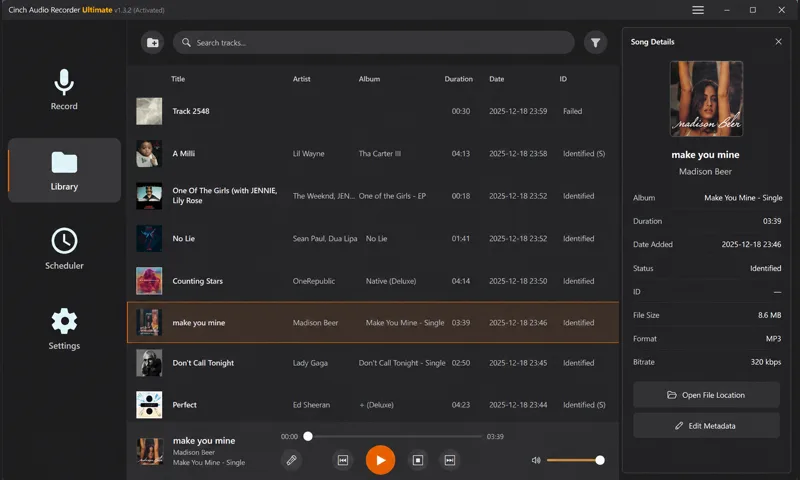
1What Cinch Audio Recorder is built around
The product is not just a recorder. It is designed around the full path from playback to a usable offline library.
Real recording workflow
Visitors can discover the product, test it, find help, and purchase without getting lost between unrelated pages.
Offline-first value
Cinch is made for users who want streaming audio saved as local files they can search, manage, and revisit later.
Support that stays nearby
Downloads, guides, policies, and troubleshooting pages are kept close to the product path before and after installation.
Review resources
Tutorial authors, reviewers, and resource editors can use the Review Kit for current product facts, screenshots, source pages, and contact details.
2Product focus
This domain is dedicated to Cinch Audio Recorder. Each page should help users understand the recording workflow, compare their options, and move from trial to daily use with less friction.
- Since 2017, Cinch has focused this product experience on recording and organizing streaming audio.
- Cinch Audio Recorder is the product for recording, recognizing, and managing saved audio files.
- The current website structure keeps product, download, support, policy, and article paths simple.
- Future content should focus on practical setup guides, troubleshooting, and SEO-friendly use cases.
3For reviewers and tutorial creators
Use the Review Kit when preparing a product comparison, tutorial, resource listing, or software review.
Product facts and screenshots
Find conservative product positioning, current screenshots, source pages, and review angles in one place.
Open Review KitTutorial creator resources
Plan a video or article around viewer problems, safe wording, source pages, and workflow-specific screenshots.
Plan tutorialCurrent downloads and release notes
Check the Download Center and Changelog before mentioning installers, versions, or availability.
Open ChangelogSupport contact
Ask support to verify product facts, review access questions, or screenshots before publishing.
Contact support