
Product type
Desktop audio recorder for saving computer playback as local audio files on Windows and macOS.
Use this FAQ with the Review Kit when preparing a software review, tutorial, comparison article, directory listing, or video walkthrough about Cinch Audio Recorder.
These points are intentionally conservative so reviewers do not rely on stale third-party listings or exaggerated claims.
Desktop audio recorder for saving computer playback as local audio files on Windows and macOS.
The Download Center currently lists Windows v1.5.4.9, with release notes available in the changelog.
The Mac path is handled through the Download Center and support email so reviewers can request the current installer details.
Do not describe the product as a bypass tool or as a way to improve audio beyond the original source.
Use these answers as a fact-checking base, then rewrite in your own editorial voice. Keep legal use, format limits, and source quality clear.
Cinch Audio Recorder is a desktop audio recorder for saving computer playback as local audio files, then reviewing format, metadata, artwork, lyrics, filenames, and library organization after capture.
Use the Product page for positioning, the Download Center for current installer paths, the changelog for Windows release notes, the user guide for setup, and Support for activation or troubleshooting questions.
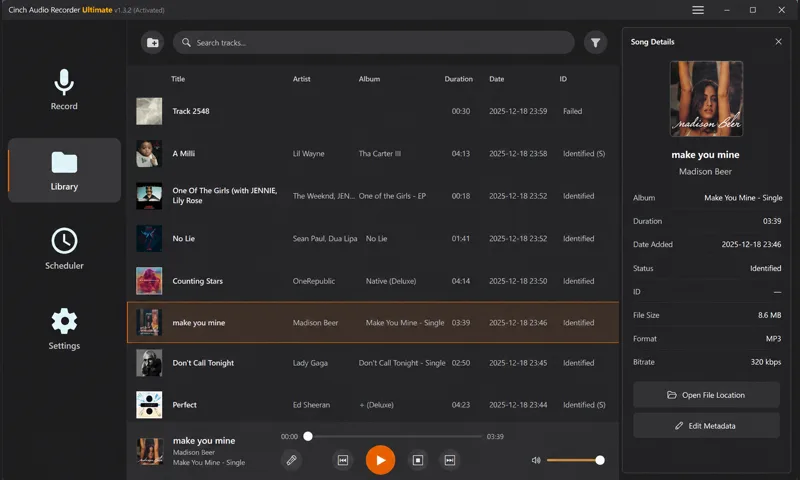
Yes. The Review Kit shows the same product screenshots used across the site, including the recording interface, Library, recording status, and scheduler views. Link back to the Review Kit or the relevant source page for context.
Avoid claims that Cinch guarantees compatibility with every source, bypasses protected playback, removes legal restrictions, or improves the quality of compressed source audio. The safe language is recording, review, cleanup, format choice, and organization.
Say that format choice affects storage, compatibility, and editing workflow. Do not say that exporting to WAV, FLAC, or a higher bitrate restores detail that was not present in the source playback.
Install from the Download Center, record a short familiar source, play the saved file, then check format, file name, metadata, artwork, lyrics, and output folder before trying a long session.
Yes. The site includes free browser tools for short local workflows. Use the online recorder comparison when explaining when a quick browser tool is enough versus when a desktop recorder is more practical.
Send questions to support@cinchaudiorecorder.com. Include the article, video, directory listing, screenshot, or comparison draft you are preparing so support can answer with the right context.
Use these pages for current downloads, release notes, screenshots, setup guidance, format wording, and support contact details.
Send the draft context to support before publishing claims about current versions, installers, screenshots, or platform-specific setup.