
How to Send Audio Proof in a Sales Follow-Up
 By HenrikUpdated Aug 7, 20267 min read
Create a short follow-up audio sample that answers one buyer question with context, consent, and a clear next step.

Sales follow-up audio should make the next step easier. It might be a short product sound, a before-and-after sample, a voice demo, a support proof clip, or a section from a conversation that the prospect asked to hear again.
The risk is sending too much. A long raw recording, unclear filename, private source detail, or oversized attachment can make a useful follow-up feel careless.
Check the File Before Sharing
| Stage | Free tool | What it helps you decide |
|---|---|---|
| 1 | Audio Metadata Viewer | Check format, duration, size, and labels before sharing. |
| 2 | Recording Quality Checker | Confirm the clip is audible, complete, and not clipped. |
| 3 | Audio Trimmer | Cut only the moment that supports the follow-up. |
| 4 | Audio Normalizer | Make the listening copy clear on laptop or phone speakers. |
| 5 | Audio Compressor | Make a smaller sharing copy after review. |
| 6 | Online Audio Format Converter | Create a compatible copy if the recipient needs another format. |
| 7 | Audio Metadata Editor | Add product, use case, date, or review-note labels. |
The recipient should immediately understand why the file was sent.
Step 1: Choose the Follow-Up Purpose
Pick one job for the audio:
- Prove the product output.
- Share a short demo sample.
- Show a before-and-after result.
- Replay a requested explanation.
- Send a troubleshooting example.
- Confirm what the final deliverable could sound like.
If the file does not help the next decision, use a written note instead.
Step 2: Inspect Before Sharing
Use Audio Metadata Viewer to check file size, duration, format, and existing labels. Remove or avoid labels that expose private project names or internal notes.
Use Recording Quality Checker to make sure the shared copy is not silent, clipped, or missing the ending.
Step 3: Trim to the Useful Moment
Use Audio Trimmer on a copy.
Good follow-up clips are usually:
- Short enough to preview quickly.
- Clear enough to understand without a long explanation.
- Labeled so the recipient knows what to listen for.
- Free of private chatter or unrelated context.
If the recipient needs the full file, send the full file separately and explain why.
Step 4: Make It Easy to Hear
Use Audio Normalizer if the proof clip is too quiet. Do not make it unrealistically loud compared with the actual product or source.
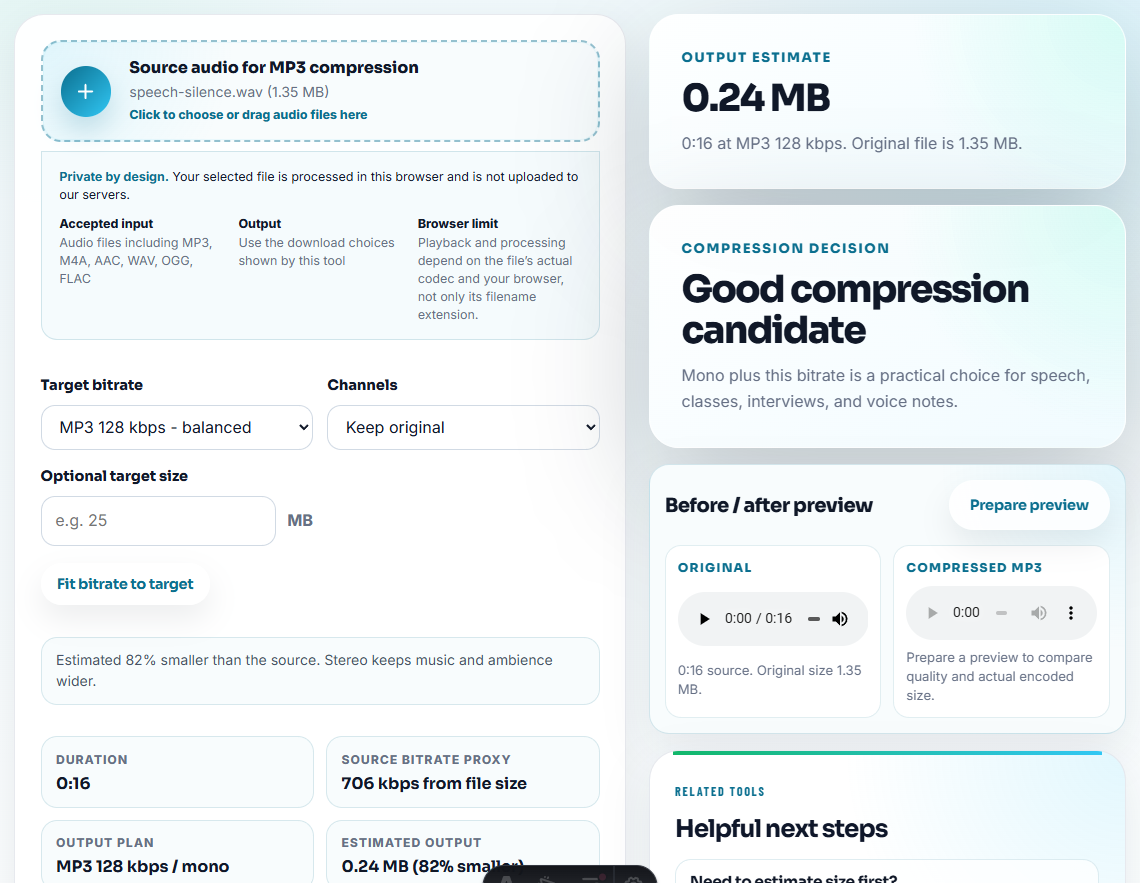
Use Audio Compressor only after playback and labels are confirmed. If compatibility is the issue, use Online Audio Format Converter on a copy and test it before sending.
Step 5: Label the File Like a Follow-Up
Use a filename that connects to the conversation:
follow-up-demo-recording-sample.mp3
requested-before-after-audio-example.mp3
product-output-sample-for-review.mp3
support-proof-clip-short.mp3
Use Audio Metadata Editor when the file may be downloaded, forwarded, or stored by the prospect.
Step 6: Add a Short Note
Do not send the clip alone. Pair it with one sentence:
This is the 30-second cleaned recording sample we discussed, prepared as a smaller review copy.That note makes the audio easier to evaluate and reduces confusion.
Choose the Proof Format Before Sending
Sales follow-up is usually one-to-one, so the safest file is the one that answers the buyer’s exact question with the least extra context. Pick the format before editing:
| Buyer asked for | Better follow-up proof | Why |
|---|---|---|
| ”Can I hear the result?” | One short output sample. | Keeps the answer focused on quality. |
| ”What changed after cleanup?” | Before-and-after pair with matched loudness. | Shows the change without overstating it. |
| ”Can I share this internally?” | Small approved copy with neutral labels. | Avoids private or confusing source names. |
| ”Will this solve my support issue?” | Support-safe symptom or result clip plus written next step. | Keeps troubleshooting separate from sales pressure. |
If none of these fits, a written follow-up is usually stronger than an attachment.
Tie the Follow-Up Clip to the Next Decision
A follow-up clip should help the prospect decide or act. If it does not connect to a next step, it is usually better as an internal note.
| Next decision | Best audio to send | Follow-up line |
|---|---|---|
| Can the output quality work for us? | Fair short sample or before-and-after clip. | ”Listen for the result section we discussed, not a full product demo.” |
| Can our team review this internally? | Small approved sharing copy with neutral filename. | ”This copy is prepared for internal review; the source is retained separately.” |
| Does this answer my use case? | One use-case-specific proof point. | ”This clip shows the workflow outcome for the scenario you raised.” |
| Do we need support before buying? | Support-safe example or written next step. | ”This shows the issue pattern; setup details are handled separately.” |
This keeps sales follow-up helpful without turning audio into pressure or unsupported proof.
Use a Follow-Up Safety Check
Before sending, check whether the clip answers the buyer or creates a new risk.
| Safety question | Send if yes | Hold if no |
|---|---|---|
| Does the clip answer the exact question asked? | Send with one context line. | Rewrite the reply or choose a different sample. |
| Is the source safe for this buyer? | Keep the neutral filename and approved copy. | Use an internal demo or product-created sample instead. |
| Is the claim boundary clear? | Include what the clip proves and does not prove. | Send written explanation only. |
| Is the file easy to open? | Compress or convert the approved copy if needed. | Test before sending. |
| Is there a clear next step? | Ask for review, approval, or a follow-up call. | Do not attach audio just to add weight. |
This gives sales teams a repeatable gate for useful follow-up instead of improvising with whatever audio is nearby.
Follow-Up Details That Answer the Buyer
- Do not attach a long raw recording when a short proof clip is enough.
- Do not include private meeting or customer audio without permission.
- Do not send a file named
sample-final.mp3. - Do not compress before checking the clip still proves the point.
- Do not mix rough drafts and approved clips in one folder.
- Do not rely on audio when the recipient needs pricing, setup, or licensing details in writing.
When a Follow-Up Clip Should Stay Internal
Keep the audio internal when permission is unclear, the clip came from another customer, the file only supports a vague claim, or the prospect asked for pricing, setup, or license terms rather than proof. Audio should clarify a decision, not replace the commercial answer.
When Browser Prep Is Enough for Sales Follow-Up
Browser prep works for sales follow-up when you are turning one call moment into a private recap, not producing public collateral. Clip only the buyer’s question or objection, keep the full call in the CRM or approved storage, and check that the follow-up text does not overstate what was said.
Use a larger workflow when follow-up materials need legal review, customer approval, transcripts, brand review, or many account-specific versions.
Helpful Next Steps
- Audio Metadata Viewer
- Recording Quality Checker
- Audio Trimmer
- Audio Compressor
- Use Demo Audio to Prove One Product Outcome
- Answer Demo Requests With Safe Audio Proof
- Give Sales Approved Audio Proof for Objections
- Use Audio in Renewal Emails Without Overclaiming
- Share Audio in Newsletters Without Heavy Files
Last Review Points
What would confuse someone opening the file later?
Send a short relevant clip, check that it plays clearly, label the context, avoid private source material, and keep the original separate from the shared copy.
Should I send the full recording after a sales call?
Only when the recipient asked for it. In most cases, a focused proof clip or demo sample is easier to review.
What should I check for sales follow-up audio?
Send a short proof clip that answers the buyer question, label the scenario clearly, and avoid claims that the sales team cannot repeat safely.