
How to Hand Off Audio Files Without Losing Context
 By HenrikUpdated Aug 7, 20267 min read
Prepare an audio handoff package with clean copies, notes, labels, short samples, and files teammates can actually review.

Many audio handoffs fail because the sound is not the only thing being handed off. The next person also needs context: what the file is, what changed, which copy to review, and what should not be overwritten.
A handoff package should answer three questions fast: which file is original, which copy is for review, and what the next person is supposed to check.
Match the Package to the Next Person
The right handoff depends on whether the next person is reviewing, editing, publishing, or archiving the audio.
| Recipient | Needs most | Include | Do not send only |
|---|---|---|---|
| Editor | Source quality and notes | Original, review copy, and edit notes | A compressed sample |
| Reviewer | Easy listening and clear context | Labeled review copy and short note | A folder of unnamed takes |
| Publisher | Final delivery file | Final copy, metadata, and usage note | The raw source alone |
| Support teammate | Reproducible symptom | Short sample and file details | A vague long recording |
| Archivist | Traceability | Original, date, source, and version labels | Renamed files with no history |
Use the Tools in This Order
| Pass | Tool to open | Check to make |
|---|---|---|
| 1 | Audio Metadata Viewer | Record duration, format, size, and file details before making copies. |
| 2 | Recording Quality Checker | Catch silence, clipping, level issues, or broken sections before handoff. |
| 3 | Audio Trimmer | Create a short sample or remove obvious waste from the review copy. |
| 4 | Audio Normalizer | Make the listening copy easier to review. |
| 5 | Audio Metadata Editor | Add title, project, version, date, speaker, or note fields. |
| 6 | Audio Compressor | Create a smaller review copy after preserving the source. |
A good handoff package reduces questions. It does not hide the original source.
Step 1: Separate Source, Review, and Delivery Copies
Create a simple folder before editing:
Audio-Handoff
01-source-original
02-review-copy
03-samples
04-delivery-copy
notes.txt
This keeps the next person from guessing which file is safe to edit.
Add a Handoff Readiness Check
Before you send the package, confirm the recipient can act without asking basic questions.
| Readiness item | Ready when | Not ready when |
|---|---|---|
| File roles | Source, review, sample, delivery, and retired copies are separated | Everything sits in one mixed folder |
| Next action | The recipient knows whether to review, edit, publish, archive, or approve | The note only says “please check” |
| Source access | The editable or trusted source is available or referenced | Only a compressed copy is shared |
| Known issue | Any problem section has a timecode or sample | The recipient must listen to the whole file to find it |
| Usage limit | Public, internal, temporary, or do-not-use status is visible | The recipient may publish a review copy by mistake |
This readiness check is the difference between a file transfer and a useful handoff.
Step 2: Record Basic File Facts
Use Audio Metadata Viewer on the source file and write down the basics in your notes.
Include:
- Filename.
- Duration.
- Format.
- File size.
- Channels.
- What the file is for.
If you send multiple files, add a one-line purpose for each file. A clear note is often more useful than a clever filename.
Step 3: Check the Source Before Handoff
Use Recording Quality Checker before sending anything.
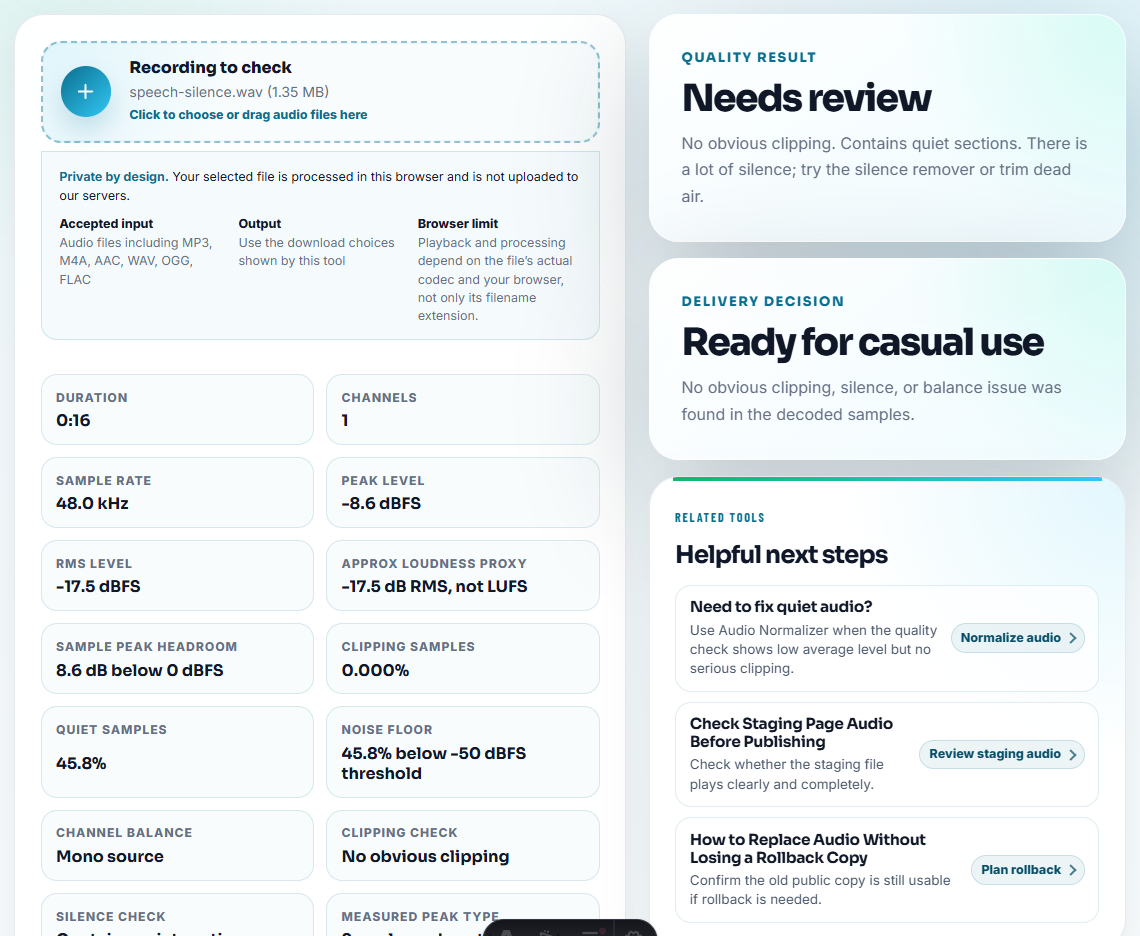
Flag:
- Silence.
- Clipping.
- Missing beginning or ending.
- Very low speech level.
- Unexpected long duration.
- A section the next person should inspect.
If there is a known problem, say so. Do not make the next person rediscover it.
Step 4: Make a Short Sample When the File Is Long
Use Audio Trimmer to create a short sample if the full file is long or the problem appears in one section.
Examples:
sample-click-noise-00m42s.mp3
sample-speaker-too-quiet-12m10s.mp3
sample-before-normalize.mp3
Samples are useful for quick review, but they should not replace the full source when editing is required.
Step 5: Normalize Only the Listening Copy
Use Audio Normalizer to make a review copy easier to hear.
Label it clearly:
meeting-review-normalized.mp3
interview-listening-copy.mp3
lesson-voice-review-v1.mp3
Do not pretend a normalized review file is the untouched source. The distinction matters if someone needs to edit or compare later.
Step 6: Add Useful Metadata and Notes
Use Audio Metadata Editor for the review or delivery copy when tags will help.
Good metadata:
- Project.
- Speaker.
- Episode or lesson number.
- Date.
- Version.
- Short note such as “review copy” or “trimmed sample”.
Also keep visible notes outside the file. Some apps ignore metadata, but everyone can read a short text note or filename.
Handoff Note Template
handoff purpose:
recipient:
source file:
review copy:
delivery copy:
sample or timecode:
known issue:
allowed use:
do not use:
next action:
decision needed:
owner:
Keep the note short. The goal is to make the first review accurate, not to write a full production report.
Step 7: Compress Only the Copy That Needs to Travel
Use Audio Compressor when the review copy is too large for the handoff method.
After compression:
- Play the file.
- Confirm the issue or content is still audible.
- Keep the source available.
- Do not delete the larger copy until the next person confirms receipt.
Optional: Add a Waveform Clue
Use Audio Waveform Generator when a visual clue helps explain the handoff.
This can help show:
- The problem section.
- Long silence.
- A loud peak.
- Where the useful clip starts.
- Before-and-after differences.
Keep the image as a support clue, not as a replacement for listening.
Quality Checks Before You Hand Off Audio Files Without Losing Context
- Do not send only
final.mp3with no context. - Do not overwrite the source with a processed copy.
- Do not compress the only editable version.
- Do not bury the important sample inside a huge folder.
- Do not rely on metadata alone for handoff instructions.
- Do not send private audio to people who do not need it.
Use Browser Tools for a Small Handoff Package
A browser workflow is enough for a handoff package when the receiver needs a small set of clear, labeled files. Keep source files in a separate folder, include notes for each export, and make sure the final package answers what the next person must do.
Use a project-level audio workflow when you need multitrack sessions, version control, legal review, redaction, captions, or formal delivery specifications.
Tools That Pair With This Task
- Audio Metadata Viewer
- Recording Quality Checker
- Audio Trimmer
- Audio Metadata Editor
- Share Cloud Audio Without Confusing Recipients
- Send Client Audio Review Copies They Can Judge
- Hand Off Audio Ownership With Clear Next Actions
- Show Support the Exact Audio Problem
Checks Worth Making First
What should be inside an audio handoff package?
Include the original or source reference, cleaned listening copy, short sample if needed, clear filenames, basic notes, and any converted or compressed delivery copy.
Should I send only the compressed version to an editor?
No. Send a smaller review copy when useful, but keep the original or higher-quality source available if the next person needs to edit.
When should I stop and keep the original?
Package the source, review copy, final copy, owner, and next action together so the receiver does not have to infer what to do.