
How to Build Audio Samples QA Can Test Again
 By HenrikUpdated Aug 7, 20266 min read
Build stable audio test samples with expected output, defect labels, and repeatable checks for future QA runs.
QA regression audio is not a random test file. It is a controlled sample that helps a team confirm whether a fix still works after new changes.
The sample should be repeatable, labeled, and kept separate from edited output copies. Otherwise, the test stops proving anything.
Make the Review Copy Easy to Trust
| Review pass | Tool | What it catches |
|---|---|---|
| 1 | Audio Metadata Viewer | Capture source format, duration, channels, size, and labels. |
| 2 | Recording Quality Checker | Confirm the baseline sample plays as expected. |
| 3 | Audio Trimmer | Cut a repeatable test section from a source copy. |
| 4 | Audio Waveform Generator | Create a visual baseline for timing, gaps, peaks, or endings. |
| 5 | Audio Compressor | Make smaller review copies while preserving source separately. |
| 6 | Online Audio Format Converter | Create controlled format variants for compatibility tests. |
| 7 | Audio Metadata Editor | Add test case, expected result, version, and status labels. |
QA files should make future testing easier, not harder.
Step 1: Choose the Regression Purpose
Decide what the sample is testing:
- Silence handling.
- Clipping detection.
- Export duration.
- Channel balance.
- Metadata behavior.
- Format compatibility.
- Before-and-after processing quality.
One test file can support one clear regression question. If it supports several, document each one.
Step 2: Preserve the Source
Use Audio Metadata Viewer to record the source details before editing. Keep the original sample in a source folder and create a working copy.
A simple structure works:
source/
test-input/
expected-output/
actual-output/
review-notes/
That structure prevents future QA runs from comparing the wrong files.
Step 3: Check the Baseline
Use Recording Quality Checker to confirm the source or test input is not broken before it enters the regression set.
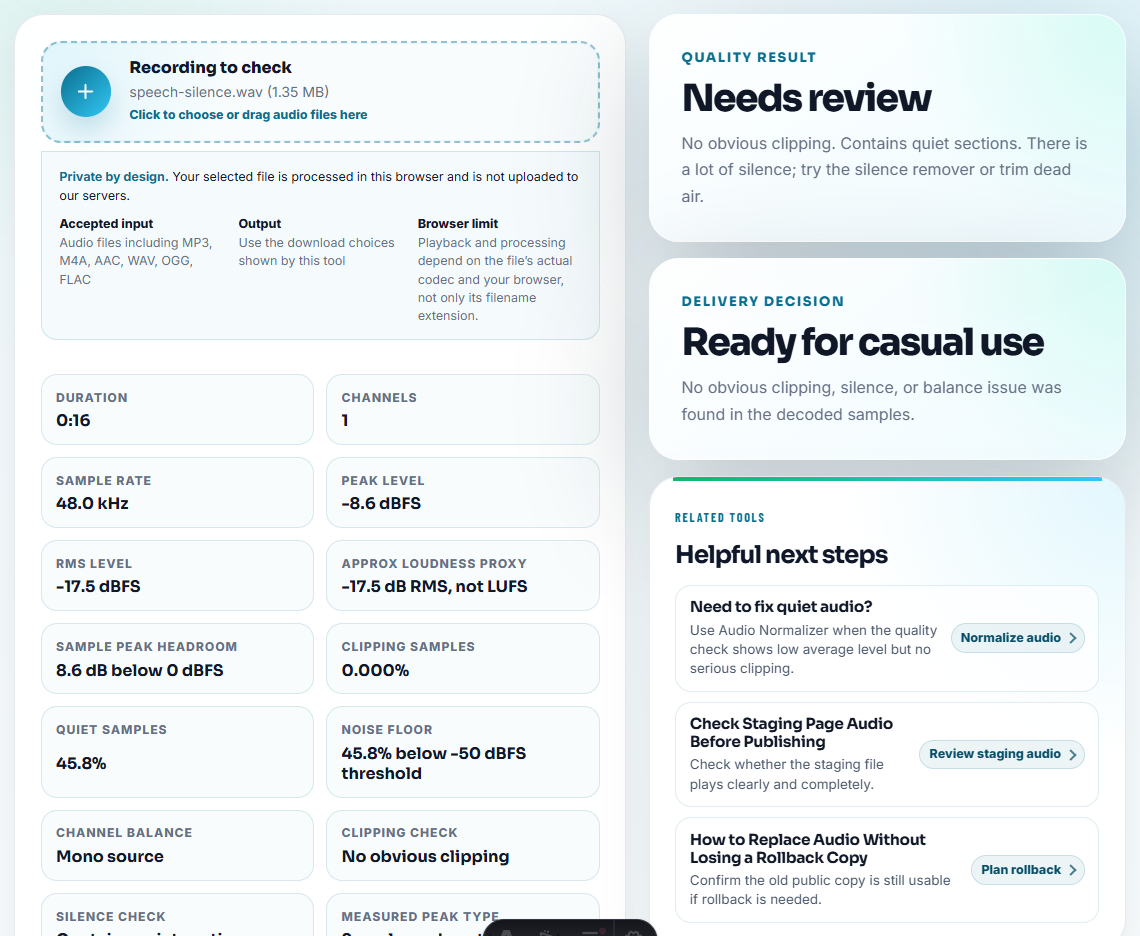
If the baseline is supposed to contain a problem, label that clearly. A “bad” sample can be useful when the expected behavior is to detect or preserve the issue.
Step 4: Trim Controlled Test Sections
Use Audio Trimmer only on copies. Shorter samples make regression runs faster and easier to review, but they still need to contain the tested behavior.
Useful filenames include:
qa-regression-low-volume-input.mp3
qa-regression-silence-gap-source-copy.mp3
qa-regression-export-duration-test.wav
qa-regression-channel-balance-input.mp3
Keep naming consistent so future test reports stay readable.
Step 5: Create Visual Baselines
Use Audio Waveform Generator to create reference images for known silence, peaks, gaps, endings, or timing sections.
This helps reviewers compare whether the output still looks roughly like the expected pattern before they listen closely.
Step 6: Make Controlled Variants
Use Online Audio Format Converter when the QA case needs format variants. Label these as variants, not as replacements for the source.
Use Audio Compressor only for review copies. Do not compress the source input unless compression itself is the test case.
Step 7: Label Expected Results
Use Audio Metadata Editor to add labels such as:
- Test case name.
- Input type.
- Expected result.
- Product version.
- Created date.
- Review status.
- Notes on known defects.
Add a short note beside the file:
Expected: output keeps full duration and no silent gap after export. Source sample must remain unchanged.Promote Fix Evidence Into Regression Samples
After a real audio fix, decide whether the evidence should become a regression sample. Not every incident deserves one, but repeated or costly defects should leave a reusable test.
| Fix evidence | Promote when | Regression note |
|---|---|---|
| Missing ending sample | The same export or trim mistake could return | Expected output keeps the final marker |
| Wrong metadata sample | Product or support depends on title, artist, or label fields | Expected metadata behavior is documented |
| Format failure sample | Users reported playback on a specific format or device path | Target player or format is named |
| Large file delivery issue | Source and delivery copies were confused | Expected public size range is recorded |
| Customer confirmation sample | The customer validated a specific repaired section | Keep only if private details are removed |
This makes the site content more useful because it shows how one fix can improve future QA, not just close one ticket.
Tie Each Sample to One Defect Risk
Regression audio should tell QA what could break again. If a sample is only labeled “test audio,” future reviewers will not know why it exists.
| Regression risk | Test sample should preserve | Expected result to record |
|---|---|---|
| Fast, scratchy, or distorted playback returns. | The shortest input that previously showed the defect. | Output plays at normal speed without new distortion. |
| Track names or metadata disappear. | A file with known title, artist, track, or naming behavior. | Metadata stays present or the expected fallback is documented. |
| Export creates silence or cuts off the ending. | A source with audible start, middle, and ending markers. | Output keeps duration and no unexpected gap appears. |
| Format conversion breaks playback. | One controlled source plus named format variants. | Each variant opens in the target player or fails with a known note. |
This makes the page more useful for real QA work because the audio is tied to a defect class, not just a file format.
QA Reuse Check Before Saving the Sample
- Do not overwrite the source sample.
- Do not silently replace test input files with edited copies.
- Do not compress or convert files unless that is part of the test.
- Do not leave QA samples unlabeled.
- Do not mix expected output and actual output in one folder.
- Do not use private customer audio without approval.
When Browser Prep Is Enough for Regression Samples
For QA regression tests, browser tools help prepare stable samples that make the same bug easy to re-check. Keep baseline and current outputs separate, avoid manual cleanup that changes the test condition, and document the expected sound.
Use a deeper QA system when tests need automation, checksums, logs, source-control tracking, privacy review, device matrices, or repeated build-to-build comparisons.
Where to Go After This Check
- Audio Metadata Viewer
- Recording Quality Checker
- Audio Trimmer
- Online Audio Format Converter
- Confirm an Audio Fix Is Ready to Accept
- Add Audio Evidence That Makes Bug Reports Clear
- Write Audio Review Notes People Can Act On
Before You Share the File
What should I avoid hiding from the listener?
Choose a repeatable sample, preserve the source, trim the test section, check playback, label the expected result, and keep converted or compressed copies separate.
Should QA regression test audio be edited?
Only create controlled copies. The source should stay unchanged so future QA runs can compare the same input and output reliably.
What should I check for QA regression audio?
Keep a stable source, expected result, defect label, and repeatable test copy so future QA runs compare the same input instead of a moving target.