
How to Make Bedtime Audio Calmer and Safer to Play
 By HenrikUpdated Aug 7, 20266 min read
Prepare calmer bedtime audio copies with trimmed starts, tamed spikes, gentle fades, and safer playlist order.
A bedtime playlist is not just a list of relaxing files. One loud intro, sudden ad break, sharp laugh, or hard ending can make the whole playlist feel unsafe for sleep.
Bedtime audio should not surprise the listener with loud starts, sharp endings, or sudden volume jumps. Prepare calmer copies and test them at the level they will actually be played.
Sort Files by Sleep Risk
A safer bedtime playlist starts with selection. Some files need a gentle edit, while others should not be in a sleep playlist at all.
| File type | Sleep risk | Safer edit | Playlist position |
|---|---|---|---|
| Calm narration | Long pauses or sudden chapter starts | Trim rough edges and add fades | Middle or late |
| Ambient track | Loop click or abrupt ending | Test repeat and fade out | Late |
| Podcast episode | Ads, laughs, or intro music | Remove or avoid alerting sections | Early only |
| Audiobook chapter | Sudden scene change | Check peaks before normalizing | After the listener is settled |
| Music track | Chorus or drum hit wakes the listener | Choose a calmer source instead | Keep out if it still spikes |
Make the Review Copy Easy to Trust
| Review pass | Tool | What it catches |
|---|---|---|
| 1 | Audio Metadata Viewer | Check duration, format, and file details before building the playlist. |
| 2 | Recording Quality Checker | Spot clipping, silence, sudden level changes, and rough peaks. |
| 3 | Audio Trimmer | Remove loud intros, ads, long waits, or endings that should not play at night. |
| 4 | Sleep Audio Jump-Scare Tamer | Reduce sudden loud moments in otherwise calm files. |
| 5 | smooth harsh starts and endings | Smooth starts and endings so track changes feel less abrupt. |
| 6 | Audio Normalizer | Make final bedtime copies more predictable without making them loud. |
Prepare playlist copies in a separate folder. Do not overwrite your original audiobook, music, or ambient files.
Step 1: Choose Files That Already Fit the Goal
Start by deciding what the playlist is for:
- Falling asleep.
- Quiet reading.
- Background calm.
- Bedtime audiobook listening.
- Low-volume travel listening.
Then remove files that obviously do not fit: dramatic music, loud ads, energetic intros, sharp transitions, or recordings with constant interruptions. Tools help polish a good source. They do not turn a chaotic file into a calm one.
Step 2: Inspect Duration and File Details
Use Audio Metadata Viewer to check duration and format. This helps you avoid mixing a ten-minute rain loop, a two-hour audiobook chapter, and a short notification-style clip without noticing.
Useful labels:
01 - Rain - 30 min.mp3
02 - Calm Talk - 45 min.mp3
03 - Audiobook Chapter 04 - 38 min.mp3
Simple names make it easier to control playlist order on phones, speakers, and USB folders.
Step 3: Check for Sleep-Risky Peaks
Open candidates in the Recording Quality Checker. You are looking for sudden changes, not studio perfection.
Watch for:
- A loud opening sting.
- Long silence followed by a sudden sound.
- Clipped peaks.
- A harsh ending.
- One file that is much louder than the others.
If a file has many unpredictable spikes, consider leaving it out. Bedtime audio should be boring in a good way.
Step 4: Trim Rough Starts and Endings
Use Audio Trimmer before any loudness changes.
Common bedtime cuts:
- Intro music.
- Promotional sections.
- Long setup chatter.
- Abrupt endings.
- Blank space before a sudden restart.
Trim only the copy. For audiobooks and lectures, keep enough context so the content still makes sense.
Step 5: Tame Sudden Loud Moments
Use Sleep Audio Jump-Scare Tamer on files that are mostly calm but contain a few loud moments.
Good examples:
- Rain audio with one door sound.
- Quiet talk with a sudden laugh.
- Audiobook narration with a loud character voice.
- Meditation audio with a sharp bell.
Test the result at low volume. Do not flatten the whole file until it feels lifeless. The goal is fewer surprises.
Step 6: Add Fades for Track Changes
Use smooth harsh starts and endings when a track begins or ends too sharply.
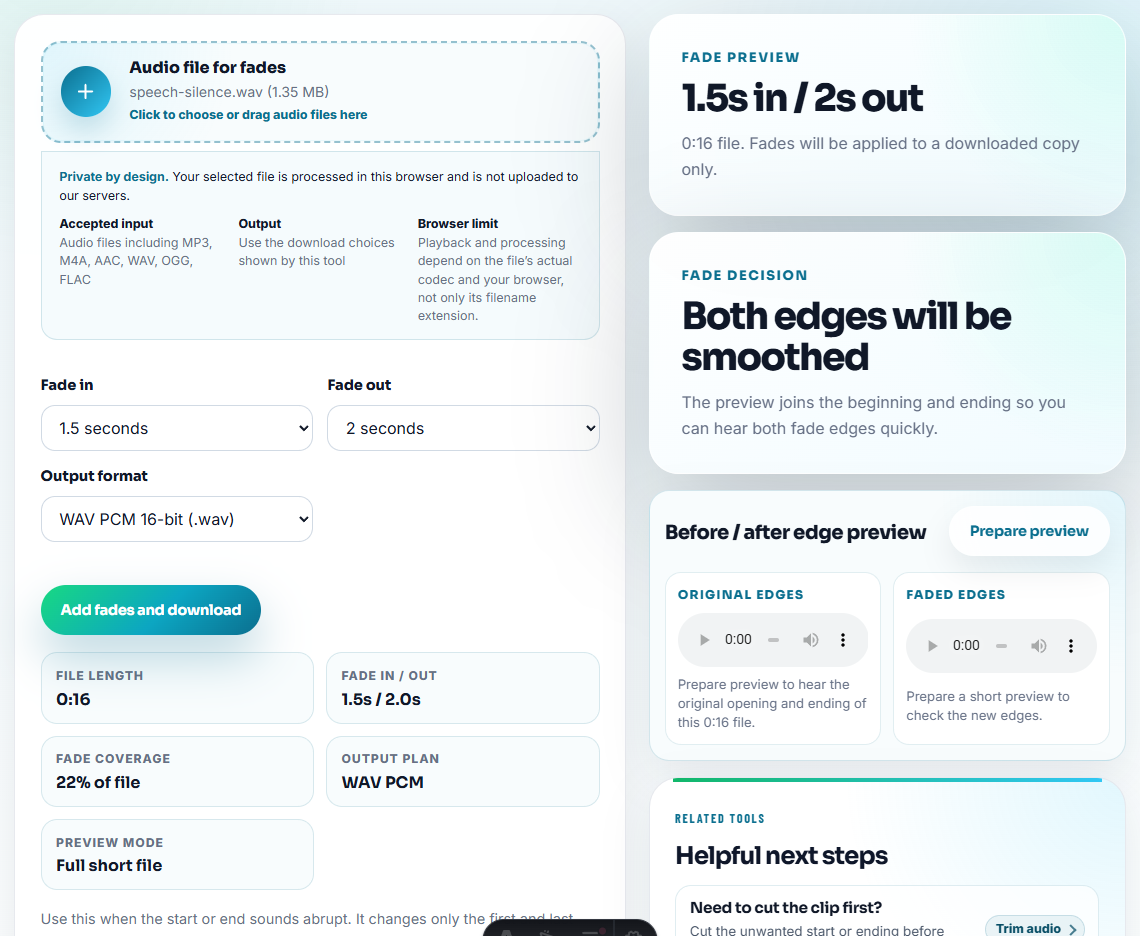
Small fades can help:
- A rain file starts suddenly.
- A voice begins before the listener is ready.
- A track ending clicks.
- A playlist moves from speech to ambience.
Keep fades short enough that they do not remove important words.
Step 7: Normalize Gently at the End
Use Audio Normalizer only after trimming and spike taming. Bedtime files should not be mastered like workout music.
After normalization, test the playlist on the real device at a low volume. A speaker, phone, earbuds, and pillow speaker can all make different details stand out.
Bedtime Playback Check Before You Use the Playlist
- Do not boost bedtime audio until it feels like normal music.
- Do not leave loud intros just because the rest of the file is calm.
- Do not mix alert sounds and sleep sounds in the same late-night folder.
- Do not normalize before removing long silence or loud sections.
- Do not trust a waveform alone; listen through the final order.
- Do not overwrite original audiobook or ambient files.
Use Free Tools for a Small Listening Set
For a bedtime playlist, browser tools are enough when you only need calmer starts, consistent volume, and predictable ordering for personal listening. Keep original tracks unchanged, avoid loud transitions, and test the playlist at the volume you actually use at night.
Use a full editor when you need detailed manual restoration, multi-track ambience mixing, precise loudness standards, or a professional sleep-content release.
Where to Go After This Check
- Sleep Audio Jump-Scare Tamer
- Audio Trimmer
- smooth harsh starts and endings
- Audio Normalizer
- Make Sleep Audio Softer and Less Startling
- Make Audio Easier to Hear on Phone Speakers
- Make Audio Files Play at a Consistent Volume
- Make Audiobook Listening Copies Easier to Follow
Common Edge Cases
What makes a good bedtime listening playlist?
A good bedtime playlist uses calm source files, removes rough starts, avoids sudden loud moments, keeps volume predictable, and places more alerting files earlier.
Should bedtime audio be made as loud as normal music?
No. Bedtime copies should be comfortable and predictable at low volume, not maximized for loudness.
Can a browser workflow remove every startling moment from sleep audio?
No. They can reduce obvious spikes and rough edits, but you should still listen through the final playlist at low volume on the device you will use.