
How to Share a Temporary Audio Workaround Clearly
 By HenrikUpdated Aug 7, 20267 min read
Prepare temporary audio workarounds that solve an immediate problem without hiding source limits, ownership, or replacement timing.

Sometimes the final audio fix cannot happen immediately. The source needs approval, engineering needs time, a page must stay usable, or the recipient needs a format that works today.
A temporary workaround can help, but only if it is clearly labeled and does not become the forgotten permanent copy.
Start With the Source File
| Task | Tool | Result to verify |
|---|---|---|
| 1 | Audio Metadata Viewer | Confirm the source, current public copy, format, duration, size, and labels. |
| 2 | Recording Quality Checker | Check that the workaround copy is audible, complete enough, and not clipped. |
| 3 | Audio Trimmer | Create a shorter workaround when only one safe section is needed. |
| 4 | Online Audio Format Converter | Create a compatible temporary copy when the current format fails. |
| 5 | Audio Compressor | Create a smaller temporary copy when size blocks upload, email, or page use. |
| 6 | Audio Metadata Editor | Add temporary, source, limit, owner, and replacement-needed notes. |
The workaround should solve the immediate problem without hiding the need for a better final fix.
Step 1: Name the Temporary Need
Choose one reason:
- Current format does not open for the recipient.
- Public file is too large for the page.
- Full file contains private or unrelated material.
- Final source approval is not ready.
- The ideal replacement needs engineering review.
- A page needs a short safe sample now.
If you cannot name the temporary need, you may be creating another messy file.
Step 2: Preserve the Source
Before making a workaround, keep the source separate:
01-source-preserve
02-current-public-copy
03-temporary-workaround
04-final-replacement-needed
Do not let the temporary file become the only copy.
Step 3: Choose the Lightest Workaround
Pick the smallest useful change:
| Problem | Temporary workaround |
|---|---|
| Format rejected | Convert a copy to a compatible format. |
| File too large | Compress a delivery copy after checking content. |
| Private section included | Trim a safe excerpt from a copy. |
| Full fix delayed | Publish a clearly labeled safe sample. |
| Wrong public file | Replace with an approved temporary copy and record follow-up. |
Avoid multiple edits unless the immediate problem truly needs them.
Use a Workaround Safety Gate
Before sharing the temporary copy, check whether it solves the immediate problem without creating a larger one.
| Gate | Safe enough when | Stop when |
|---|---|---|
| Source | The workaround came from a known source or approved public copy | Source, permission, or owner is unclear |
| Scope | The copy is used for one clear purpose | People may reuse it as final proof |
| Playback | The needed section, start, and ending pass | The workaround introduces silence, clipping, or cutoff |
| Metadata | Public labels are clean and temporary status is clear | Private notes or draft labels remain |
| Expiry | Owner and review date are written down | No one knows when to replace it |
If any gate fails, the safer answer is usually “do not use this file publicly yet.”
Step 4: Check the Workaround Copy
Use Recording Quality Checker after trimming, converting, or compressing.
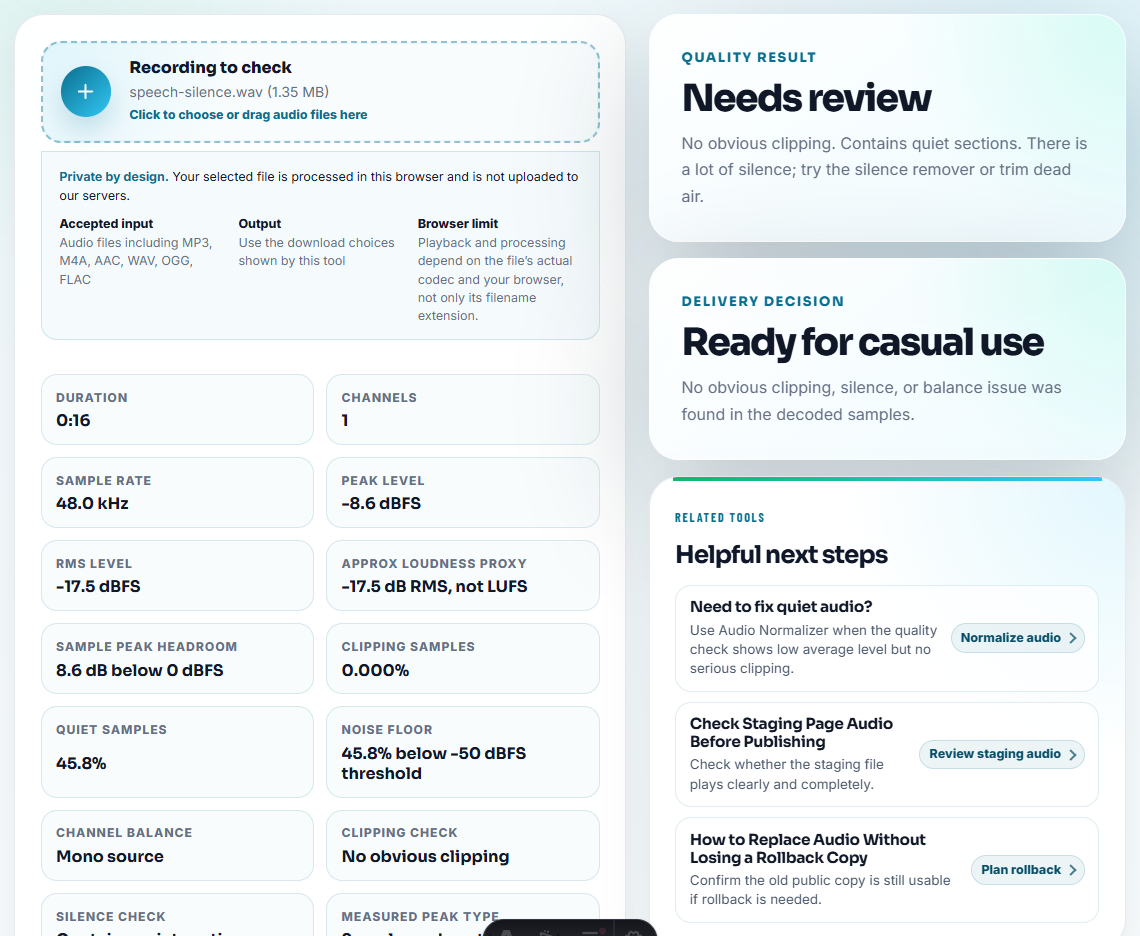
Check:
- The needed section is present.
- The file is not silent.
- The ending is not accidentally missing.
- The copy is not badly clipped.
- The content matches the stated temporary purpose.
A workaround that introduces a new audio problem is not a workaround.
Step 5: Label the Limit Clearly
Use Audio Metadata Editor on the workaround copy:
Temporary workaround. Source preserved. Use until approved replacement is ready. Owner: support.Write the limit somewhere visible:
- Temporary format copy.
- Temporary compressed copy.
- Temporary public excerpt.
- Temporary replacement pending source approval.
- Temporary customer confirmation copy.
Step 6: Plan the Final Replacement
Every workaround needs a next step:
final action: replace with approved source export after engineering review
owner: web content team
review date: 2026-08-07
If there is no owner or date, the workaround can quietly become permanent.
Make the Expiration Visible
The biggest risk with a workaround is not the temporary file. It is forgetting that the file is temporary. Put the limit where future editors will see it.
| Workaround type | Visible limit | Replacement trigger |
|---|---|---|
| Temporary format copy. | ”Use until the original format issue is fixed.” | Recipient or platform can open the preferred format. |
| Temporary compressed copy. | ”Lower-size delivery copy; source preserved.” | Final approved export is ready. |
| Temporary public excerpt. | ”Safe excerpt while permission/source review continues.” | Full approved public copy is available. |
| Temporary support sample. | ”For troubleshooting only, not marketing proof.” | Support case closes or formal article sample is created. |
This keeps short-term fixes from becoming stale public assets.
Give Users a Clear Instruction
The user-facing note should tell people exactly what to do with the temporary file.
| Situation | Clear instruction |
|---|---|
| Compatible copy is available | ”Use this MP3 copy for now. The original-format fix is still under review.” |
| Public page has a safe excerpt | ”Use the short checked excerpt until the full approved file is replaced.” |
| File should not be reused | ”Do not use the older copy. It has been retired while source review continues.” |
| No workaround is safe | ”Please wait for the approved replacement; the current file should not be published.” |
This avoids a common support problem: the recipient receives a file but does not know whether it is temporary, final, or only for troubleshooting.
Workaround Check Before You Tell Users to Try It
- Do not call a workaround final.
- Do not overwrite the approved source.
- Do not publish a temporary copy without playback testing.
- Do not hide privacy, permission, or source uncertainty.
- Do not compress first when the content may be wrong.
- Do not leave the workaround without a replacement plan.
When You Do Not Need a Desktop Recorder
For a temporary workaround, browser prep is enough when the goal is to make a file usable until the real fix arrives. Label the workaround clearly, keep the broken source for diagnosis, and remove the temporary copy once the permanent version is ready.
Use a stricter workflow when the workaround affects legal claims, customer consent, paid pages, regulated content, or business-critical downloads.
More Ways to Check the File
- Audio Metadata Viewer
- Recording Quality Checker
- Audio Trimmer
- Online Audio Format Converter
- Replace Broken Public Audio With Rollback Proof
- Stop the Same Audio Problem From Returning
Quick Answers Before You Continue
What is an audio temporary workaround?
It is a safe short-term copy or process used when the ideal fix is not ready, such as a compatible format, smaller file, trimmed section, or clearly labeled replacement.
Should a workaround replace the final audio fix?
No. A workaround should be labeled as temporary, checked for playback, tied to the source file, and followed by a planned final replacement or review.
What proof should I keep after this step?
Make the workaround clear, temporary, and reversible; include only the audio copy users need until the real fix is ready.