
How to Attach Proposal Audio Without Overpromising
 By HenrikUpdated Aug 7, 20266 min read
Prepare proposal audio attachments that support one proposal claim, stay private-safe, and avoid overpromising from one sample.

Audio in a proposal should make a claim easier to understand. It might be a short before-and-after example, a product sound sample, a customer-approved proof clip, or a recorded explanation that supports one section of the proposal.
The attachment should not feel like homework. If the recipient has to listen through several minutes to find the point, the audio is not helping the proposal.
Prepare One Proof Clip for One Claim
| Sequence | Free tool | What to look for |
|---|---|---|
| 1 | Audio Metadata Viewer | Check file details, hidden labels, format, and size before attachment. |
| 2 | Recording Quality Checker | Confirm the proposal point plays clearly. |
| 3 | Audio Trimmer | Cut one proof point or sample from a working copy. |
| 4 | Audio Waveform Generator | Add a visual reference when the proposal needs timing context. |
| 5 | Audio Compressor | Make a smaller attachment copy after review. |
| 6 | Online Audio Format Converter | Export a compatible copy only when the recipient needs it. |
| 7 | Audio Metadata Editor | Add proposal section, version, use status, and source notes. |
The best proposal audio is short, labeled, and tied to one sentence in the proposal. It should support the claim, not become the claim.
Step 1: Tie the Audio to a Proposal Section
Start with the proposal point:
- Feature example.
- Before-and-after audio result.
- Customer-approved outcome.
- Support response example.
- Implementation walkthrough.
- Training or onboarding sample.
- Product quality comparison.
If the clip does not support a specific section, leave it out.
Step 2: Inspect the Source
Use Audio Metadata Viewer before attaching anything. Look for internal notes, private customer labels, rough filenames, unsupported formats, or file sizes that may be awkward for email.
Clean the delivery copy. Keep the source in your working folder.
Step 3: Check the Listening Experience
Use Recording Quality Checker to confirm the sample is understandable. Proposal recipients may listen on a laptop speaker, phone, or shared meeting room device.
If the audio is too quiet, noisy, or confusing, fix the short copy or replace it with a written note.
Step 4: Trim to the Proof Point
Use Audio Trimmer on a copy. Keep just enough context so the recipient knows what they are hearing.
Useful filenames:
proposal-attachment-before-after-proof.mp3
proposal-attachment-product-sample-section-3.mp3
proposal-attachment-support-example-reviewed.mp3
proposal-attachment-customer-proof-private-use.mp3
Avoid generic names like “audio-final.mp3” because recipients may download and save the file outside the proposal thread.
Step 5: Add a Visual or Note When Helpful
Use Audio Waveform Generator only when it helps the proposal. For example, a waveform can show where a before-and-after section begins or where the listener should focus.
Add one short note in the proposal:
Attachment: 24-second before-and-after audio sample for the noise reduction example in Section 3.Step 6: Create the Delivery Copy
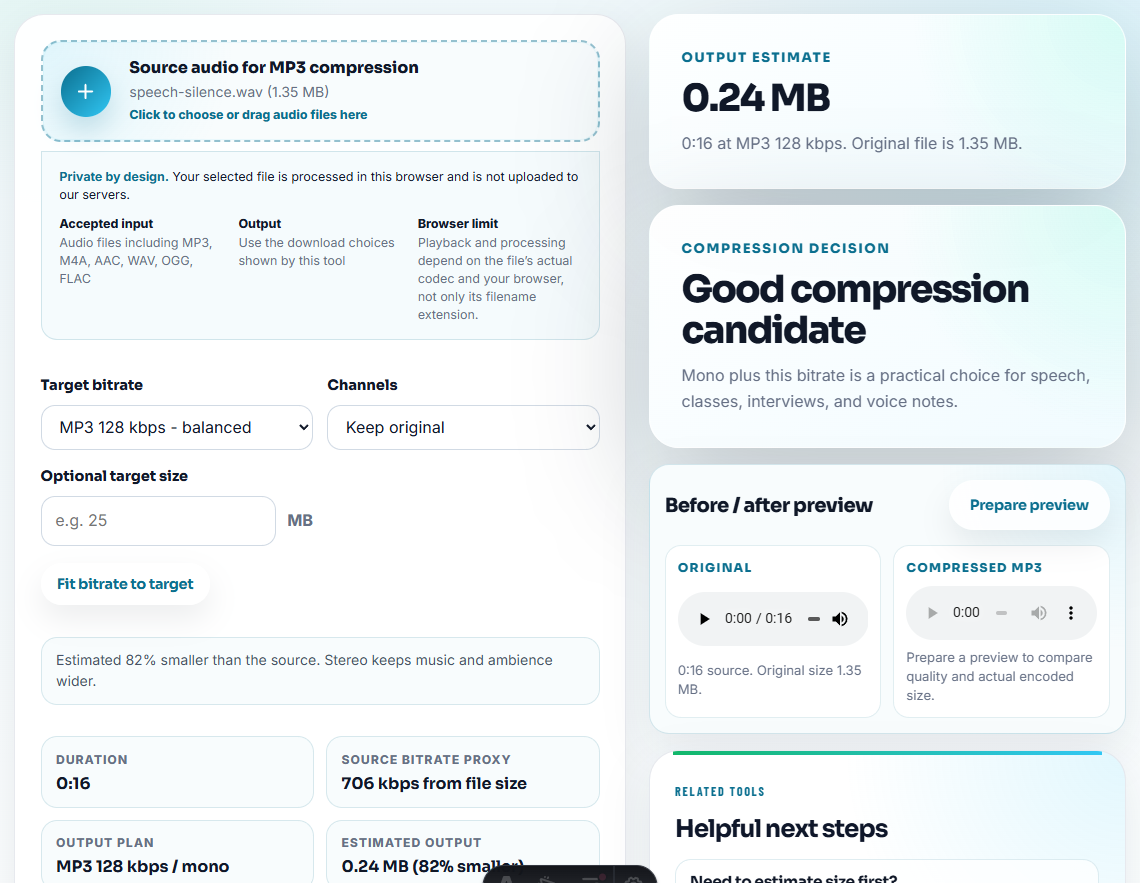
Use Audio Compressor after review so the attachment is easier to send. Use Online Audio Format Converter only when the recipient needs a more compatible format.
Do not replace the source file with the compressed copy. Keep both clearly labeled.
Step 7: Label the File for Later
Use Audio Metadata Editor to add:
- Proposal name.
- Section or use case.
- Version.
- Approval status.
- Source location.
- Internal or external use.
- Contact owner.
Example note:
Proposal attachment for Section 3. Reviewed delivery copy. Source retained separately; do not reuse as public testimonial audio.Attach Audio Only When It Changes the Decision
Proposal recipients are busy. Add audio only when hearing the file helps them understand risk, value, or fit better than text alone.
| Proposal decision | Useful attachment | Better than audio |
|---|---|---|
| Can the workflow produce the expected output? | A short product-result sample tied to the proposal section. | A written spec if the result is not audible. |
| Is a before-and-after claim credible? | A fair comparison with similar loudness and context. | A table if differences are configuration-based. |
| Can the buyer share the example internally? | A compact approved copy with neutral filename. | A private link if the sample contains account context. |
| Does the issue require support work first? | A support-safe reproduced sample. | A ticket summary if the original is customer-identifiable. |
This keeps proposal attachments persuasive without turning one audio file into an unsupported promise.
Do Not Let One Sample Carry the Whole Proposal
An audio sample can make a proposal easier to trust, but it cannot prove everything by itself. Use the clip for the part it can honestly show.
| Proposal material | What audio can prove | What it cannot prove alone |
|---|---|---|
| Before-and-after sample | A specific audible improvement under similar conditions. | That every future file will improve by the same amount. |
| Customer quote | The exact approved statement or tone. | Permission for broader public reuse. |
| Product sound | How a feature or output can sound. | Full workflow reliability across every setup. |
| Support example | The symptom or resolved state for one case. | Root cause for unrelated customer issues. |
| Implementation walkthrough | Where the listener should focus in a process. | Final commercial terms or delivery scope. |
That boundary gives the recipient useful evidence without creating a promise the proposal text does not support.
Proposal Audio Checks Before Sending
- Do not attach full raw recordings to a proposal.
- Do not include customer-identifiable audio unless the use is approved.
- Do not use a louder “after” clip as unfair proof.
- Do not send mystery files with vague names.
- Do not attach many versions without explaining which one matters.
- Do not rely on audio alone when the proposal needs a written claim.
When Browser Prep Is Enough
Browser prep is enough when the proposal needs one reviewed proof clip tied to one section. Use a larger workflow when the attachment supports pricing, legal claims, customer permission, accessibility requirements, or account-specific promises.
Use a larger workflow when the proposal needs legal approval, accessibility transcripts, signed customer permission, formal claims review, or many account-specific versions.
Related Fixes and Prep Guides
- Audio Metadata Viewer
- Recording Quality Checker
- Audio Trimmer
- Audio Compressor
- Prepare Customer Reference Audio Safely
- Send Client Audio Review Copies They Can Judge
- How to Retire Outdated Audio Proof Safely
Questions Worth Asking
What should I check before using audio for a proposal attachment?
Choose one proposal point, check the source, trim a short proof clip, verify playback, label the file clearly, add a short context note, and compress or convert only a copy.
Should proposal audio include long recordings?
No. A proposal attachment should support one claim, result, feature, or example with a short reviewed clip.
What should I check before preparing proposal audio?
Attach only a relevant proof clip, explain why it is included, keep the file small, and avoid raw recordings that distract from the proposal.