
How to Share Customer Reference Audio Safely
 By HenrikUpdated Aug 7, 20266 min read
Prepare customer reference audio that answers one prospect question while preserving permission limits and speaker context.
Customer reference audio sits between private customer conversation and public proof. It may help a prospect, partner, or internal reviewer understand what a real customer experienced, but it also carries more risk than a normal demo clip.
The safest reference check clip is narrow. It answers one question, keeps the speaker’s meaning intact, and makes the permission status obvious before anyone forwards it.
Build the Reference Check Copy in Order
| Checkpoint | Tool | Why it matters |
|---|---|---|
| 1 | Audio Metadata Viewer | Check source details, hidden labels, duration, and private notes. |
| 2 | Recording Quality Checker | Confirm the reference point is audible and complete. |
| 3 | Audio Trimmer | Cut one focused reference excerpt from a working copy. |
| 4 | Audio Waveform Generator | Add timing context when the reference point needs a timestamp or pause clue. |
| 5 | Audio Compressor | Create a smaller review or delivery copy after approval. |
| 6 | Online Audio Format Converter | Convert only when the recipient cannot open the source format. |
| 7 | Audio Metadata Editor | Add permission, audience, source, customer-safe title, and usage notes. |
The job is controlled sharing, not making a raw recording sound more persuasive than it really is.
Step 1: Define the Reference Question
Do not start by asking, “Which clip sounds best?” Start with the question the reference needs to answer:
- Did setup become easier?
- Was support responsive?
- Did the audio result improve?
- Was the workflow practical for daily use?
- Did the customer solve a specific problem?
- Is this an internal-only reference or approved external sharing?
If the question is unclear, the clip will be misused.
Step 2: Check Permission Before Editing
Before trimming anything, write down the allowed use:
- Internal reference only.
- One named recipient.
- Sales team review only.
- Customer-approved private share.
- Public use not approved.
- Do not forward.
Keep that note with the file. A reference clip can move quickly between teams, and a filename alone is not enough.
Step 3: Inspect the Source
Use Audio Metadata Viewer to inspect the copy before sharing it. Look for private names, account identifiers, support ticket numbers, renewal notes, or internal project labels.
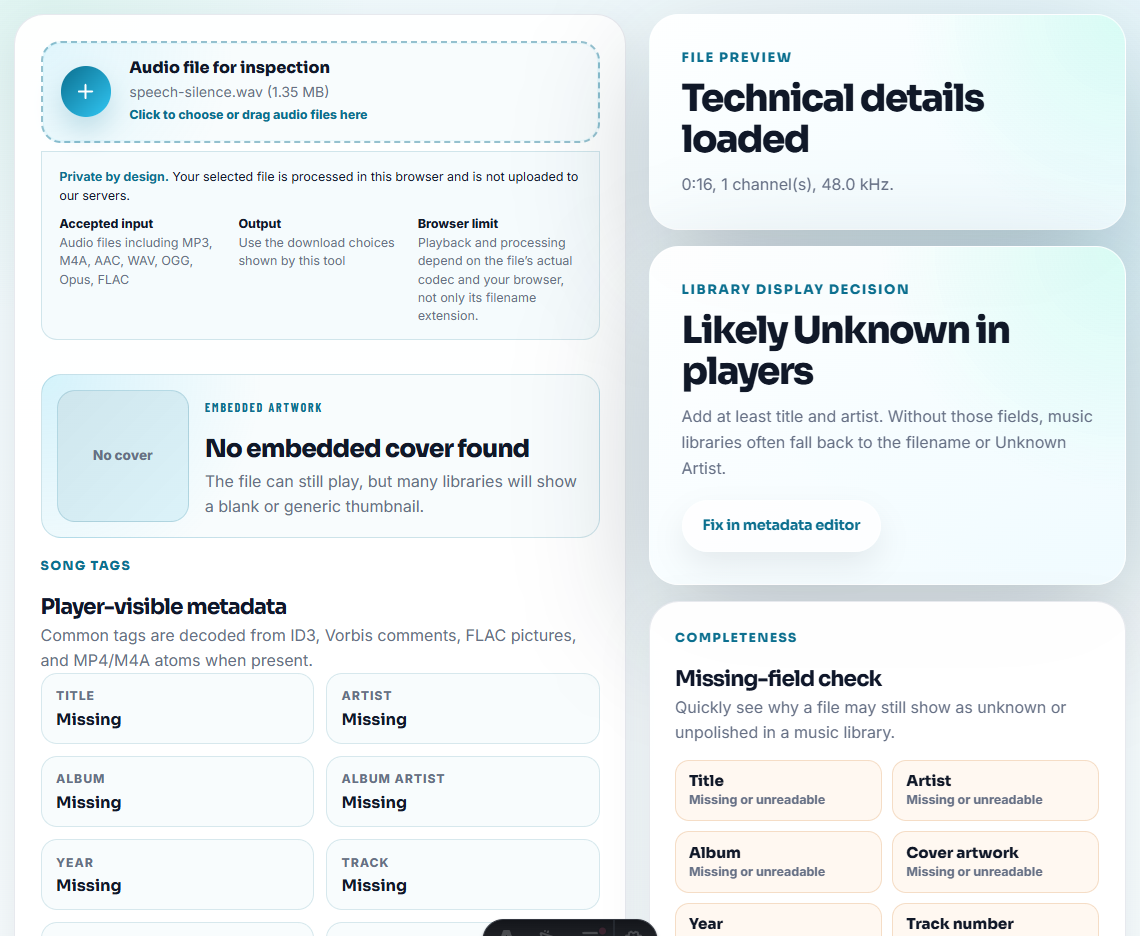
If the source contains sensitive context, keep the original restricted and prepare a clean excerpt instead.
Step 4: Check Playback and Meaning
Use Recording Quality Checker to confirm the reference moment is clear. Then listen for meaning:
- Does the clip include enough context?
- Does the speaker sound uncertain?
- Is there a condition or limitation after the quote?
- Would the clip still be fair if heard by someone outside the original account team?
If the answer is no, use a written summary instead of the audio.
Step 5: Trim One Reference Excerpt
Use Audio Trimmer on a copy. Keep one reference point per file.
Useful filenames:
reference-check-setup-easier-approved-private.mp3
reference-check-support-response-internal-only.mp3
reference-check-audio-quality-context-needed.mp3
reference-check-do-not-forward.mp3
Avoid vague names like “best-customer-proof.mp3”. They invite overuse.
Step 6: Add Context for Review
Use Audio Waveform Generator only when timing helps. For example, a waveform can point to the exact answer, a long pause, or the before-and-after comparison section.
Add a short written note:
Reference point: customer says setup was easier after guided onboarding. Approved for one private reference check; not approved for public page use.Step 7: Prepare the Delivery Copy
Use Audio Compressor after review so the file is practical to attach or upload. Use Online Audio Format Converter only when the recipient needs another format.
Use Audio Metadata Editor to add permission, audience, date, product, and source-reference labels.
Answer One Reference Risk at a Time
A reference clip should answer the buyer’s concern without becoming a general testimonial. Treat the prospect question as the organizing principle.
| Prospect concern | Best reference excerpt | Safer boundary |
|---|---|---|
| Will setup be difficult? | A short setup outcome or onboarding quote. | Do not imply the same timeline for every customer. |
| Does support respond well? | A context-rich support resolution comment. | Keep ticket details and private escalation notes out. |
| Is the audio result good enough? | A fair sample or customer comment tied to the workflow. | Avoid broad quality claims from one account. |
| Can this be shared internally? | A private-use clip with explicit audience label. | Do not let it drift into public case study use. |
This makes the page more useful because it teaches controlled reference use, not just clip preparation.
Assign a Reference Permission Tier
Reference audio should have a permission tier before it is shared. The tier decides who may hear it and what they may do with it.
| Tier | Who may hear it | Use limit |
|---|---|---|
| Internal reference | Your own team only. | Learn from the context, but do not forward. |
| Named prospect | One approved prospect or account team. | Do not reuse for another deal. |
| Partner review | A named partner reviewer. | Do not publish or embed without new approval. |
| Public candidate | Awaiting formal testimonial or case-study approval. | Keep out of public pages until reviewed. |
| Public approved | The exact excerpt is approved for a named public use. | Do not use in ads, press, or new pages unless included in scope. |
This gives teams a safer way to handle real customer voice without turning every useful reference into a public testimonial.
Problems to Catch Before You Share Customer Reference Audio Safely
- Do not send a raw customer call as a reference asset.
- Do not reuse a private reference clip as a testimonial.
- Do not remove context that changes the speaker’s meaning.
- Do not hide permission limits in a separate chat thread.
- Do not compress or convert the only source file.
- Do not send the clip without a written note explaining allowed use.
When a Quick Local Check Is Enough
For customer reference checks, use browser tools only for private internal review of possible proof points. Keep consent and source notes attached, remove unrelated customer details, and do not reuse the clip externally until the reference owner approves it.
Use a stricter workflow when the reference names a customer publicly, supports a legal or regulated claim, may be forwarded widely, or needs formal approval tracking.
Related Tools and Guides
- Audio Metadata Viewer
- Recording Quality Checker
- Audio Trimmer
- Audio Metadata Editor
- How to Confirm Audio Permission Before Public Use
Quick Answers Before You Continue
What should I check before using audio for a customer reference check?
Use a copy, confirm permission, inspect metadata, check playback, trim one fair reference excerpt, add context notes, label allowed use, and share a compact version.
Should a reference check include raw customer call audio?
Usually no. Use a reviewed excerpt or summary unless the customer has clearly approved broader sharing.
What should I check for customer reference audio?
Use only approved reference clips, include the customer context, and make sure the sample does not reveal details outside the reference agreement.