
How to Review Audio Problems Behind Churn Risk
 By HenrikUpdated Aug 7, 20266 min read
Organize audio complaints into clear evidence for playback issues, access blockers, missing metadata, and follow-up timing.
Churn review audio can help a team hear the difference between a surface reason and a real reason. A customer might mention price, but the useful moment could be confusion during setup, weak onboarding, repeated support friction, or a feature gap.
The audio should support a clear churn reason, not become another long file nobody has time to replay.
Use the Tools in This Order
| Step | Free tool | What to confirm |
|---|---|---|
| 1 | Audio Metadata Viewer | Check source details, duration, format, size, and private labels. |
| 2 | Recording Quality Checker | Confirm the churn-related section is audible and complete. |
| 3 | Audio Trimmer | Cut the customer statement, issue, or outcome from a copy. |
| 4 | Audio Waveform Generator | Add timing context for a quote, pause, gap, or before-and-after point. |
| 5 | Audio Compressor | Create a smaller review copy after approval. |
| 6 | Online Audio Format Converter | Convert only when the review workflow needs another format. |
| 7 | Audio Metadata Editor | Add churn reason, product, segment, date, and review labels. |
The clip should help the team decide what to improve next.
Step 1: Choose the Churn Reason
Start with one likely category:
- Setup friction.
- Missing feature.
- Price objection.
- Poor audio result.
- Repeated support issue.
- Wrong product fit.
- Renewal blocker.
- Competitor switch.
If the audio covers multiple reasons, create separate reviewed clips and label each one.
Step 2: Inspect the Source Carefully
Use Audio Metadata Viewer before sharing churn-related audio. These files may contain account names, renewal details, billing context, or sensitive customer comments.
Keep the full source restricted. Use clean excerpts for broader churn review.
Step 3: Check the Clip Before Editing
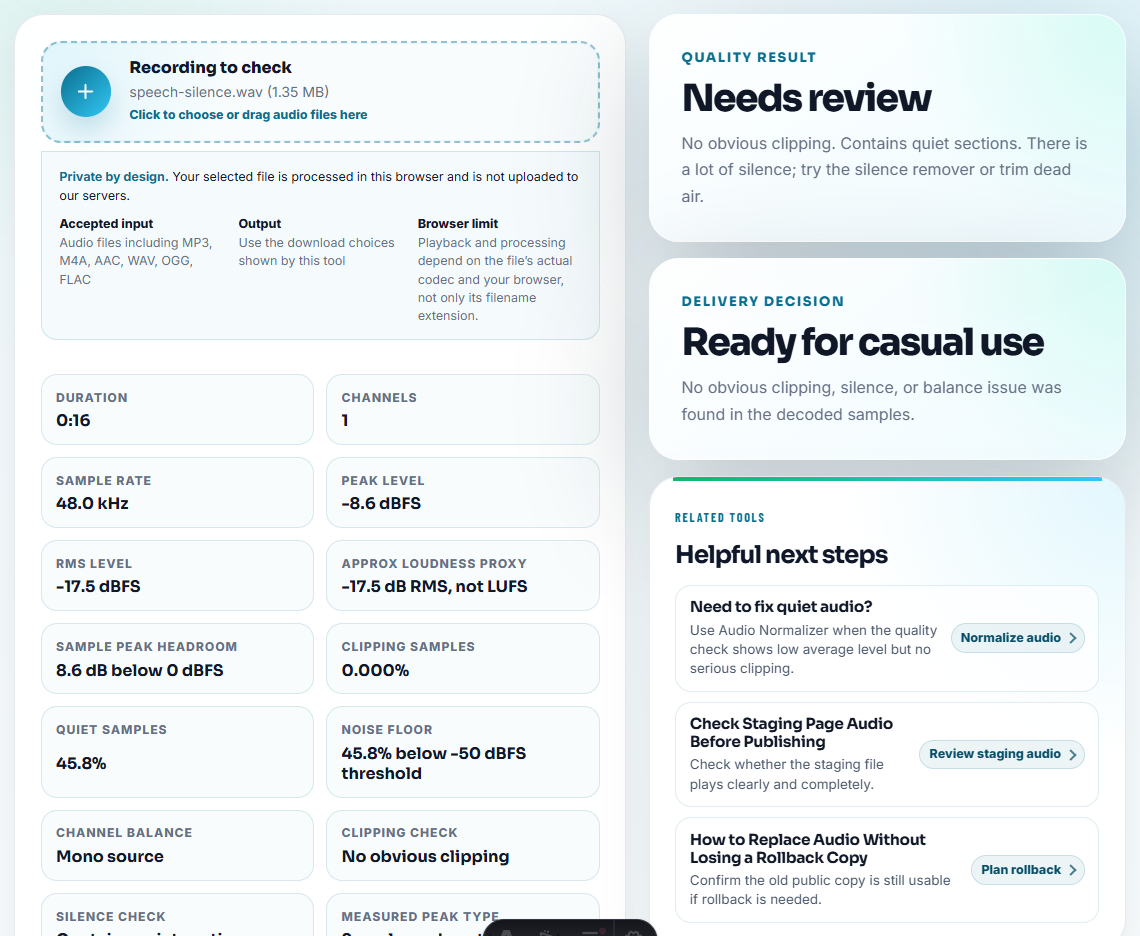
Use Recording Quality Checker to make sure the customer statement or issue is audible. A weak or unclear clip can lead the team to over-interpret the reason.
Do not remove pauses, uncertainty, or context if they affect the meaning.
Step 4: Trim to the Evidence
Use Audio Trimmer on a copy. Keep enough lead-in and ending context so the churn reason is not distorted.
Useful filenames include:
churn-review-setup-friction-quote.mp3
churn-review-feature-gap-evidence.mp3
churn-review-support-friction-short-copy.mp3
churn-review-renewal-blocker-reviewed.mp3
Use private account details only in controlled notes, not in public-facing filenames.
Step 5: Add Review Context
Use Audio Waveform Generator when reviewers need to see a timing point, silent gap, before-and-after result, or long pause connected to the discussion.
This can make churn review faster when product, success, support, and leadership are reviewing the same clip.
Step 6: Create a Review Copy
Use Audio Compressor after review so the clip is easy to add to churn notes, CRM records, internal reports, or customer success discussions.
Use Online Audio Format Converter only when the review destination needs another format.
Step 7: Label the Follow-Up
Use Audio Metadata Editor to add:
- Churn reason.
- Customer segment.
- Product or feature.
- Review date.
- Source status.
- Follow-up owner.
- Suggested action.
Then add a note:
Reason: setup friction. Customer describes confusion during first capture setup; useful for onboarding and support documentation review.What Real Support Signals Change the Review
An anonymized support mailbox scan shows that churn risk is not always caused by one bad recording. It often starts when several small signals arrive together: a user moved to a new computer, registration or download is confusing, and the first recording sounds distorted.
The risk rises when the next reply asks them to repeat tests they already tried.
For churn review, tag the clip by the decision it supports instead of the surface complaint:
| Support signal | Churn review label | What to listen for |
|---|---|---|
| New computer plus license or download confusion | Reinstall friction | Does the user understand the next step, or are they blocked before using the product? |
| Recording plays too fast, skips, or becomes scratchy after a short time | Output trust issue | Does the user describe a repeatable failure that makes every result feel unsafe? |
| Spotify or music-source recordings lack names, split points, or usable track order | Library management gap | Is the frustration about recording, metadata, or cleanup after recording? |
| The user asks for refund before support has a clean reproduction | Escalation timing | Is there enough evidence to fix the problem before the relationship is lost? |
This is the main information gain in a churn clip: it separates product defects, setup friction, expectation mismatch, and follow-up quality.
Turn the Clip Into a Churn Review Action
After the clip is prepared, write one action. Otherwise the audio becomes interesting but not operational.
| Review finding | Action owner | Best next action |
|---|---|---|
| Access or license blocker appears before product use. | Support or billing owner | Fix access path before judging product value. |
| Repeated poor recording output with examples. | Product/support owner | Attach short samples, device context, and steps already tried. |
| Metadata or library frustration dominates. | Product education owner | Clarify workflow or create a targeted help article. |
| Customer is asking for refund because replies feel circular. | Success/support lead | Stop broad testing requests and send one high-value next step. |
| Clip supports a broader trend only weakly. | VOC owner | Log as anecdotal evidence, not a trend claim. |
This makes churn review more useful for readers because it shows how to convert audio evidence into a decision, not just a transcript.
Red Flags While You Review Audio Problems Behind Churn Risk
- Do not circulate full customer calls when one excerpt supports the churn reason.
- Do not expose billing, account, or customer identity details unnecessarily.
- Do not trim so tightly that the reason sounds clearer than it really was.
- Do not treat one clip as proof of a broad trend by itself.
- Do not compress or convert the only original source.
- Do not share churn audio without a written interpretation and next action.
When Browser Prep Is Enough for Churn Review
For churn review, a browser pass is enough when the goal is to isolate one frustration, cancellation reason, or unresolved request. Keep the full customer record separate, anonymize anything unnecessary, and label the clip by issue theme instead of blame.
Use a stricter workflow when the churn review involves legal-sensitive accounts, billing disputes, public claims, executive reporting, consent tracking, or formal research archives.
Where to Go Next
- Audio Metadata Viewer
- Recording Quality Checker
- Audio Trimmer
- Audio Compressor
- Use Audio in Renewal Emails Without Overclaiming
- Turn Customer Audio Into Safe VOC Evidence
Practical Answers
What makes the file easier to review later?
Choose one churn reason, inspect the source, trim the relevant moment, check playback, remove private labels, add account-safe context, and share a compact reviewed copy.
Should churn review audio include full customer calls?
Usually no. Use short reviewed excerpts to support specific churn reasons, and keep full recordings separate with appropriate access control.
What should I check for churn review audio?
Choose clips that show the customer issue clearly, remove private sections, and tie the sample to the account, reason, or product gap under review.