
How to Choose the Right Audio Copy Before Editing
 By HenrikUpdated Aug 7, 20266 min read
Choose the best audio copy by comparing source clues, duration, quality, waveform evidence, and intended use.

When a folder has final.mp3, final-v2.mp3, copy.wav, edited-fixed.mp3, and new-final-real.mp3, the hardest question is not how to edit. It is which file deserves trust.
This guide helps you choose the best audio copy without deleting useful evidence too early.
Start With the Source File
| Task | Tool | Result to verify |
|---|---|---|
| 1 | Audio Metadata Viewer | Compare format, duration, size, channels, and hidden labels. |
| 2 | Recording Quality Checker | Check silence, clipping, low level, and obvious quality risks. |
| 3 | Audio Waveform Generator | Compare silence, peaks, rough edits, and whether one copy looks trimmed. |
| 4 | Audio Trimmer | Cut the same short section from each copy for fair listening. |
| 5 | Audio Metadata Editor | Label the chosen source, review, and final copies after the decision. |
The best copy is the one that matches the purpose. A source archive, review file, phone copy, and web upload may be different files.
Step 1: Separate Copies Before Comparing
Put likely duplicates into a temporary review folder:
possible-same-audio
source-candidate
review-copy-candidate
small-sharing-copy
do-not-delete-yet
Do not delete any file during this step. You are building evidence.
Step 2: Compare Technical Clues
Open each file in Audio Metadata Viewer.
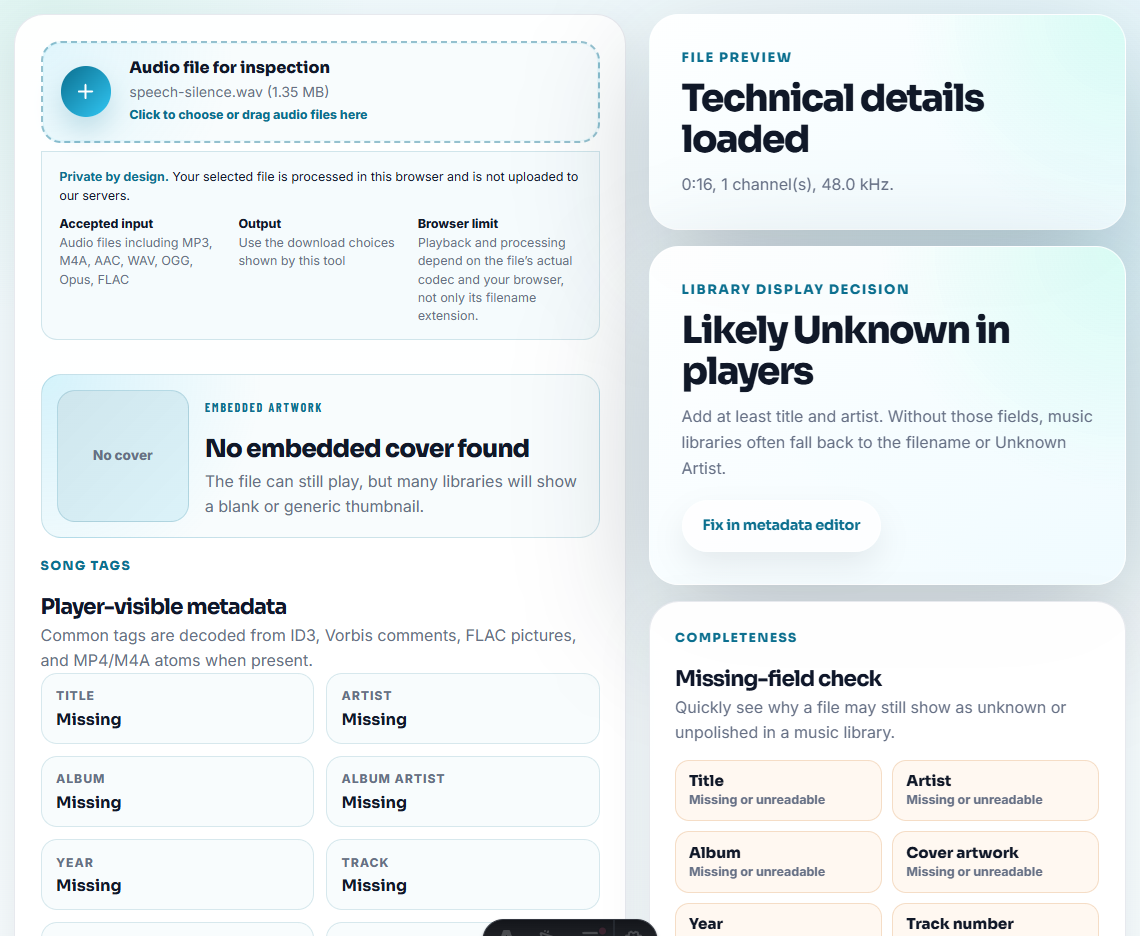
Record:
- Duration.
- Format.
- File size.
- Channels.
- Bitrate or sample rate when available.
- Existing title, date, album, comment, or source tags.
If one file is WAV or FLAC and another is a small MP3, the larger file may be the better source. But confirm by listening, because it might also include long silence or unrelated material.
Step 3: Check Quality Before Trusting a Name
Use Recording Quality Checker on each candidate.
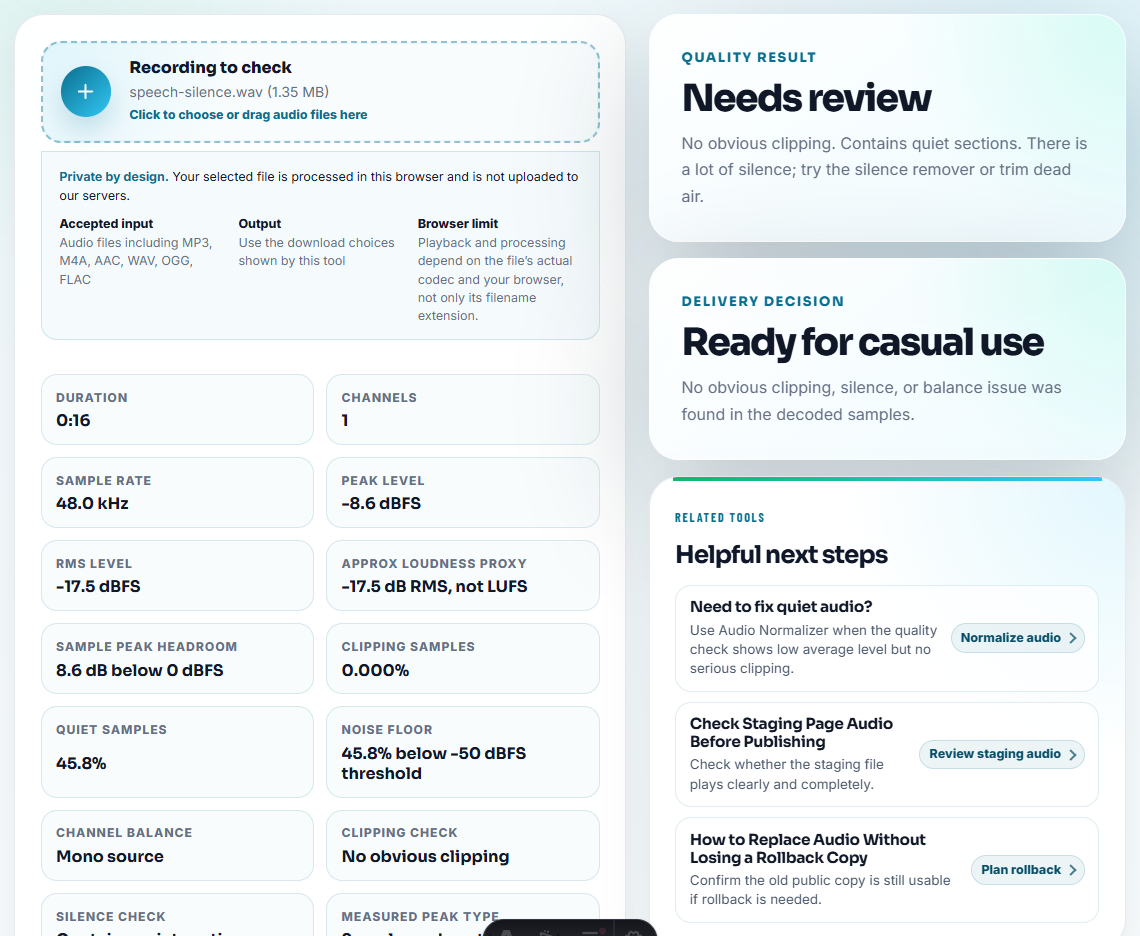
Look for:
- Silent files.
- Clipped peaks.
- Very low speech.
- Missing endings.
- Rough level changes.
- Files that look final but sound damaged.
A file named final is not automatically the best copy.
Step 4: Compare the Same Section
Use Audio Trimmer to cut the same 20 to 60 second section from each candidate copy.
Choose a section with:
- Speech or music that clearly identifies the content.
- Normal volume.
- No long silence.
- A useful cue near the beginning or end.
Listen to the samples back to back. This is more reliable than jumping around in long files.
Watch for Copies That Look Better Than They Are
Some files seem trustworthy because they are large, recent, or named “final.” Those clues help, but they are not proof.
| Misleading clue | What could be wrong | How to check |
|---|---|---|
| Largest file | It may include silence, wrong source, or untrimmed material | Compare duration and listen to the same section. |
| Newest timestamp | It may be a rushed export or accidental duplicate | Check metadata and playback quality. |
| Filename says final | It may be final for sharing, not editing | Look for source notes and compression level. |
| Cleaner waveform | It may be heavily processed or over-normalized | Listen for distortion or missing dynamics. |
| Smallest file | It may be convenient but too compressed | Keep it as sharing copy, not source. |
Step 5: Use Waveforms for Visual Clues
Use Audio Waveform Generator when two copies are hard to tell apart.
Check whether:
- One has a long blank start.
- One is clipped or heavily limited.
- One has a missing ending.
- One is a trimmed export.
- Two files share the same peak pattern.
Waveforms help you spot differences quickly, but the final decision still needs listening.
Step 6: Label Roles Clearly
After choosing, use Audio Metadata Editor or filenames to mark the role:
interview-source-original.wav
interview-review-trimmed.mp3
interview-small-share.mp3
interview-old-duplicate-do-not-use.mp3
Do not erase uncertainty if you are not sure. Use labels such as possible-duplicate or needs-review.
Choose by Role, Not by Filename
The “best” copy depends on what you need next. A source master, review excerpt, web upload, and small sharing file can all be correct for different jobs.
| Need | Prefer this copy | Reject or demote this copy | Confirmation check |
|---|---|---|---|
| Long-term source | Least processed complete file | Small compressed preview | Duration, format, and content match the original event. |
| Public web use | Approved delivery copy | Huge source file or unclear draft | Plays in the intended page or player. |
| Support evidence | Short clip that proves the issue | Full private recording | Problem is audible without extra private context. |
| Editing handoff | Clean review copy plus source pointer | File named final with no notes | Metadata or folder note explains where it came from. |
This keeps you from deleting a useful source just because a smaller copy looks convenient.
Check the Copy Before You Edit It
- Do not keep only the smallest file because it is convenient.
- Do not assume
finalmeans trustworthy. - Do not delete a source-like file before comparing content.
- Do not compare clips at wildly different listening levels.
- Do not replace a high-quality source with a compressed sharing copy.
- Do not label guesses as facts.
When You Do Not Need a Desktop Recorder
Use this workflow when you are choosing between a few versions of the same recording. Compare the same section in each file, keep rejected copies until the final choice is confirmed, and document why the selected file is better.
Use asset-management or archival software when you need automatic fingerprinting, checksums, audit logs, retention rules, or many users changing the same library.
Related Tools and Guides
- Audio Metadata Viewer
- Recording Quality Checker
- Audio Waveform Generator
- Audio Trimmer
- Know When Audio Should Be Rerecorded
- Make Audio Files Play at a Consistent Volume
- Keep Audio Versions Clear Before Final Approval
- Clean an Audio Folder Without Deleting Sources
Common Edge Cases
How do I choose the best audio copy?
Compare source clues, duration, format, quality checks, waveform shape, and listening notes before deciding which copy is the source, review, or final file.
Is the largest audio file always the best copy?
No. A larger file may be the original, but it can also be a long untrimmed export. Check duration, format, quality, and content before keeping it.
What should I check before comparing audio copies?
Compare duration, playback quality, source notes, and obvious defects first; pick the cleanest source before trimming, leveling, or editing labels.