
Find What Is Worth Keeping in a Messy Audio Folder
 By HenrikUpdated Aug 7, 20266 min read
Audit a messy audio folder, identify unknown files, flag risky recordings, and plan safer sorting before edits.
A messy audio folder is hard to fix because every file looks urgent. You may have recordings called audio1.mp3, old exports, duplicated meeting files, small sharing copies, and a few important originals mixed together.
The safest first move is not editing. It is an audit: find out what you have, what might be broken, what should be preserved, and what can wait.
Sort the Folder by Risk First
The fastest folder cleanup is not always the safest one. Put files into rough risk groups before you rename, compress, or delete anything.
| Folder clue | Likely meaning | Safer action | Do not do yet |
|---|---|---|---|
| Very large original files | Possible source recordings | Move to a protected original group | Compress or overwrite them |
| Tiny files with useful names | Review or sharing copies | Compare with larger sources | Treat them as the only copy |
| Unknown numbered files | Could be recorder exports | Inspect metadata and waveform | Rename from guesswork |
| Silent or clipped files | Possible bad takes or technical evidence | Mark for review | Delete during the first pass |
| Duplicates with different dates | Versions may not match | Keep both until checked | Pick one by filename alone |
Check the File Before Sharing
| Task | Tool | Result to verify |
|---|---|---|
| 1 | Audio Metadata Viewer | Inspect format, duration, size, channels, tags, and clues before moving files. |
| 2 | Recording Quality Checker | Flag silent, clipped, incomplete, or very low-level recordings. |
| 3 | Audio Waveform Generator | Create quick visual clues for long files, silence, peaks, and repeated sections. |
| 4 | Audio File Size Calculator | Estimate storage before making a review copy or backup workspace. |
| 5 | Audio Metadata Editor | Add short notes only after you know what a file is. |
The goal is to reduce uncertainty, not to make the folder perfect in one sitting.
Step 1: Work From a Copy
Before the audit, make a working copy of the folder if the audio matters.
Use names such as:
Messy-Audio-Originals
Messy-Audio-Working-Audit
Do not rename, trim, compress, or delete source files during the first pass. A confusing folder is frustrating, but a damaged original is worse.
Step 2: Make Four Temporary Groups
Create simple holding folders inside the working copy:
01-keep-original
02-needs-review
03-possible-duplicate
04-fix-later
These are not final archive folders. They are decision buckets. If you are unsure, use 02-needs-review.
Step 3: Inspect File Details First
Open suspicious or important files in Audio Metadata Viewer.
Look for:
- Very short files that may be accidental recordings.
- Very large files that may be originals.
- Small files that may be compressed sharing copies.
- Stereo or mono clues.
- Missing or misleading tags.
- Dates, title fields, comments, or album names that reveal the source.
Write down only useful facts. Do not try to rewrite every tag yet.
Step 4: Check the Files That Matter Most
Use Recording Quality Checker on files that are long, unique, or likely to be originals.
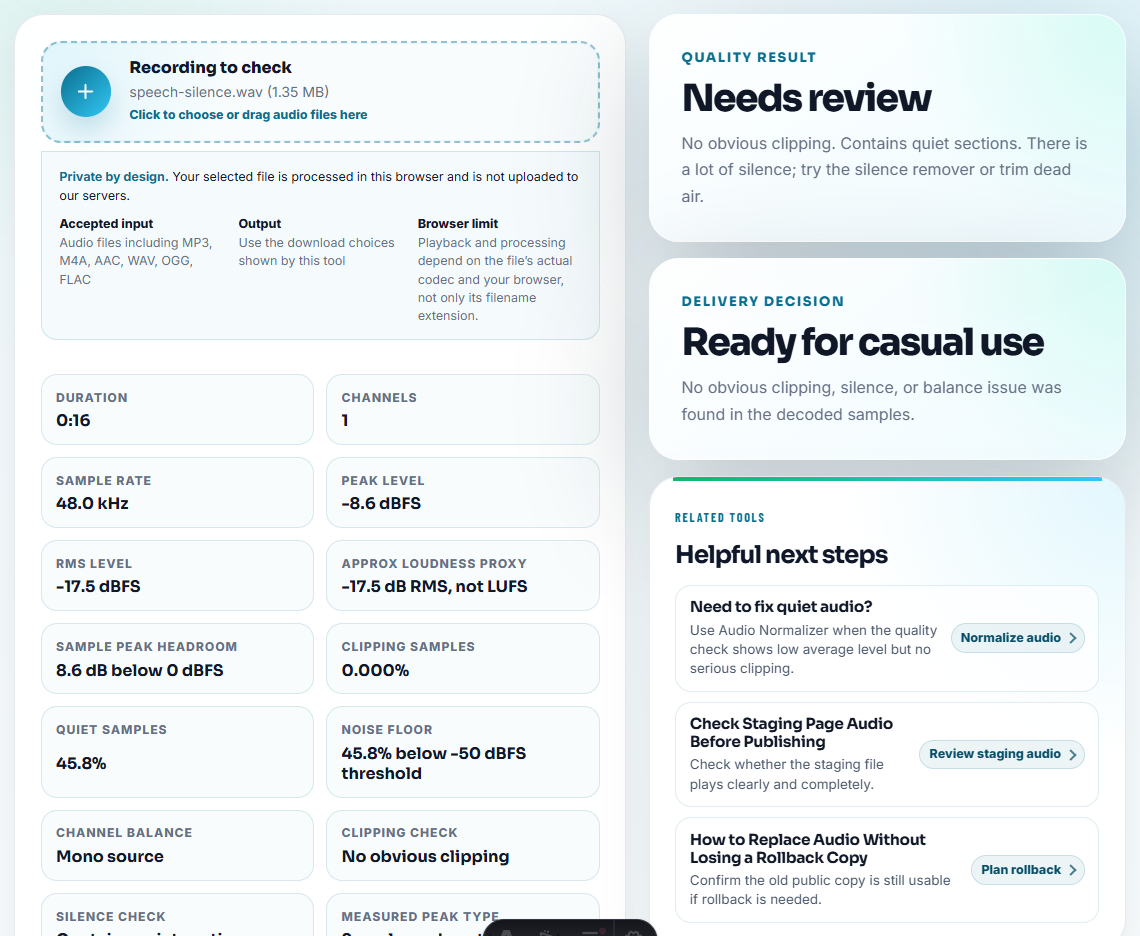
Watch for:
- Mostly silent recordings.
- Sudden clipping.
- Audio that ends too early.
- Extremely low speech.
- Files that look normal by name but fail a basic quality check.
Move these into 04-fix-later only if the content is worth keeping. A broken file can still be the only copy of an important moment.
Step 5: Use Waveforms for Fast Clues
For long recordings, create a quick waveform with Audio Waveform Generator.
A waveform can help you spot:
- Long blank starts or endings.
- Repeated sections.
- A single loud spike.
- Two files that appear to contain the same session.
- A short useful part inside a long recording.
Use the waveform as a clue, not proof. Listen before deciding.
Step 6: Estimate Space Before Duplicating Everything
If the folder is large, use Audio File Size Calculator before creating many extra copies.
Estimate space for:
- The untouched original folder.
- A working audit copy.
- Short review clips.
- Final organized copies.
- A backup location.
This is especially useful when old recordings are WAV files or long sessions.
Step 7: Add Small Notes After Identification
Once a file is identified, use Audio Metadata Editor to add a short note when it will help later.
Useful note examples:
source-original
needs-trim-start
possible-duplicate-of-2026-07-12-call
quiet-but-important
sharing-copy-only
Keep notes short. Long explanations belong in a separate checklist or project note.
Pause Before You Delete or Keep a File
- Do not delete files in the first audit pass.
- Do not rename everything before you understand what the files are.
- Do not treat the smallest file as the final copy.
- Do not fix audio quality before preserving the likely original.
- Do not trust filename order when dates and exports are mixed.
- Do not merge folders until duplicates have been reviewed.
When You Do Not Need a Desktop Recorder
For a messy folder audit, this browser workflow is enough when you are identifying duplicates, broken files, odd formats, and unclear names before cleanup. Do not delete the only copy during the audit; move questionable files into a review folder and decide after listening.
Use dedicated media-asset or backup software when you need automatic duplicate detection, checksums, chain-of-custody records, large team permissions, or policy-based retention.
Related Tools and Guides
- Audio Metadata Viewer
- Recording Quality Checker
- Audio Waveform Generator
- Audio File Size Calculator
- Identify Unknown Audio Files Before Sorting
- Clean an Audio Folder Without Deleting Sources
Quick Answers Before You Continue
What is the safest way to audit a messy audio folder?
Start with a copy, inspect file details, mark obvious keep and review groups, check important recordings, and avoid deleting or overwriting anything during the first pass.
What should I check before auditing audio files?
Start by identifying originals, duplicates, unknown formats, broken files, and anything with private or missing labels before moving or renaming the folder.
Should I fix files while auditing the folder?
Not during the first pass. The audit should identify what each file is, which files are risky, and which copies deserve careful editing later.