
How to Turn Customer Interview Audio Into Safe Notes
 By HenrikUpdated Aug 7, 20266 min read
Turn customer interview audio into safer notes by separating quotes, workflow confusion, setup blockers, and evidence that needs consent.

Customer interviews often contain useful details that get lost after the call: exact wording, hesitation, confusion, a feature request, or a moment where the customer explains the real problem.
The point is not to create a polished interview highlight. It is to prepare short, traceable audio notes that help a team understand what was said and why it matters.
Start With the Source File
| Task | Tool | Result to verify |
|---|---|---|
| 1 | Audio Metadata Viewer | Check source duration, format, size, channels, and private labels. |
| 2 | Recording Quality Checker | Confirm the interview section is audible and complete. |
| 3 | Audio Trimmer | Cut one insight, quote, objection, or question from a copy. |
| 4 | Audio Waveform Generator | Add a timing clue for a quote, pause, gap, or response section. |
| 5 | Audio Compressor | Create a smaller review copy after the section is approved. |
| 6 | Online Audio Format Converter | Convert only when the research or review workflow needs another format. |
| 7 | Audio Metadata Editor | Add interview, theme, product, date, and review labels. |
The clip should support a note. It should not force everyone to replay the full interview.
Step 1: Choose the Note Type
Decide what the audio note should preserve:
- A feature request.
- A setup problem.
- A buying objection.
- A support pain point.
- A customer phrase worth quoting internally.
- A confusing workflow step.
- A before-and-after reaction.
If the same interview covers several topics, create one reviewed clip per topic.
Step 2: Inspect the Source
Use Audio Metadata Viewer to check the source before creating excerpts. Customer interviews may contain names, account details, company references, or unrelated side comments.
Keep the full source in a controlled folder and create a clean review copy for wider internal sharing.
Step 3: Check the Listening Quality
Use Recording Quality Checker before trimming. Make sure the useful section is not clipped, silent, too quiet, or missing the context that makes the note understandable.
If the insight depends on tone, hesitation, or a pause, do not over-clean the clip.
Step 4: Trim One Insight at a Time
Use Audio Trimmer on a copy. Keep enough context so the quote or comment does not change meaning.
Useful filenames include:
customer-interview-feature-request-short.mp3
customer-interview-onboarding-confusion-note.mp3
customer-interview-support-pain-point-copy.mp3
customer-interview-objection-reviewed-clip.mp3
Avoid putting private names or account details in filenames.
Step 5: Add Timing Context
Use Audio Waveform Generator when reviewers need to jump to a specific answer, pause, or before-and-after reaction.
A simple waveform is useful when the clip will be reviewed asynchronously by product, success, support, or marketing.
Step 6: Make a Review Copy
Use Audio Compressor after review so the excerpt is practical for research notes, CRM records, internal docs, or team review.
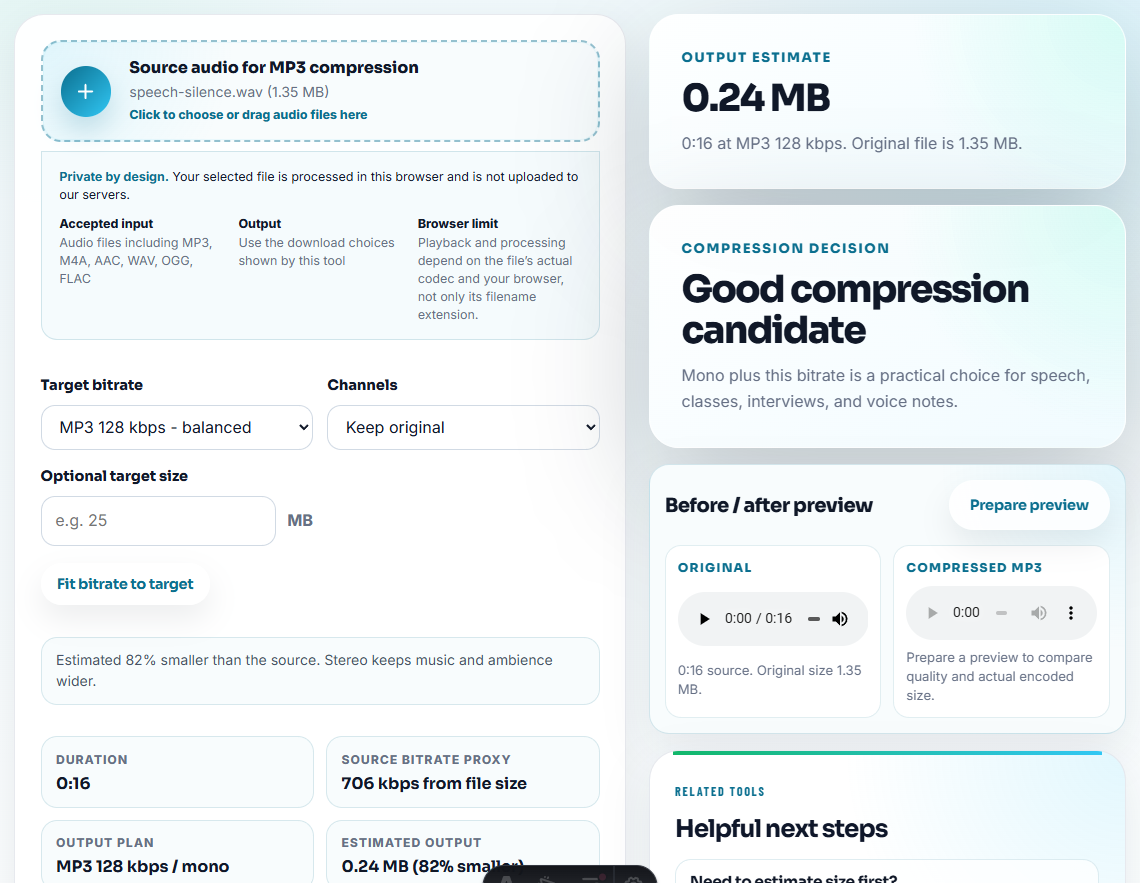
Use Online Audio Format Converter only when another tool or reviewer needs a different playback format.
Step 7: Label the Insight
Use Audio Metadata Editor to add:
- Interview date.
- Topic or theme.
- Product or feature.
- Customer segment.
- Review status.
- Source status.
- Follow-up owner.
Then pair the clip with a note:
Customer describes confusion during setup; useful for onboarding copy and product review. Full source kept separately.Interview Notes Should Preserve the Reason, Not Just the Quote
The most useful customer audio note captures why a moment matters. A quote by itself can be interesting but still fail to guide product, success, or support. Add a short reason label before the clip enters a shared workspace.
| Interview moment | Better note label | Why it helps later |
|---|---|---|
| Customer says recording sounded fast or distorted. | ”Playback trust issue; needs reproduction detail before resolution note.” | Support can ask for source, format, and timing instead of treating it as a generic complaint. |
| Customer asks how to move the product to a new computer. | ”Device-change friction; check whether install, activation, and file access are separate issues.” | Success can separate account help from audio workflow help. |
| Customer says files have numbers instead of names. | ”Metadata expectation gap; needs source app, recognition status, and naming example.” | Product can see whether the issue is recognition, tagging, or organization. |
| Customer gives a short positive outcome. | ”Private success evidence; requires permission before public use.” | Marketing gets the signal without accidentally turning research audio into a testimonial. |
This is the information gain reviewers need: the clip is not just “customer feedback,” it is a categorized piece of evidence with a next action.
Use an Interview Insight Ladder
Not every interview clip should become a product request or public quote. Classify the insight before you share it widely.
| Insight level | Meaning | Best use |
|---|---|---|
| Raw observation | The customer describes one moment or feeling. | Keep with interview notes for context. |
| Repeated signal | Several customers describe the same friction. | Add to VOC or product feedback review. |
| Product evidence | The clip shows a workflow gap, output issue, or repeated expectation mismatch. | Route to product with expected/actual notes. |
| Success evidence | The customer describes a solved problem or useful outcome. | Keep internal unless permission allows broader use. |
| Public candidate | The quote may support marketing or reference use. | Send through permission and claim review first. |
This ladder prevents a strong-sounding quote from being promoted before the team knows what it actually proves.
Check Consent and Context Before Writing Notes
- Do not circulate full interview recordings when one excerpt supports the note.
- Do not expose private customer names or account labels unnecessarily.
- Do not trim so tightly that the customer’s meaning changes.
- Do not remove pauses or tone when they explain the insight.
- Do not compress or convert the only source file.
- Do not share interview audio without a written note explaining the takeaway.
When You Do Not Need a Desktop Recorder
For customer interview notes, browser tools are enough when one short clip supports a theme, quote, or product insight. Keep the full interview private, anonymize details in shared notes, and avoid clipping so tightly that the customer’s meaning changes.
Use a stricter workflow when the interview requires consent tracking, redaction, legal review, formal research storage, transcript management, or public testimonial approval.
Related File Prep Guides
- Audio Metadata Viewer
- Recording Quality Checker
- Audio Trimmer
- Audio Waveform Generator
- Turn Product Feedback Audio Into Clear Evidence
- Turn Interview Audio Into Fair Quote Clips
Questions People Usually Ask
What context should stay with the audio?
Pick one interview insight, inspect the source, trim the relevant section, check playback, remove private labels, add context, and share a compact reviewed copy with notes.
Should customer interview notes include full recordings?
Usually no. Keep the full source separately and use short reviewed excerpts to support specific notes, decisions, or follow-up questions.
What should I check for customer interview notes?
Keep the quote accurate, preserve enough context, remove unrelated private talk, and label the clip so it connects back to the interview note.