
How to Make Language Audio Easier to Practice With
 By HenrikUpdated Aug 7, 20266 min read
Trim language audio, slow difficult sections, remove safe silence, normalize speech, split lessons, and label practice copies.

Language audio is most useful when it is easy to repeat. A full lesson, podcast, conversation, or recorded phrase may contain the right material, but not in the right shape for practice.
Language practice audio needs repeatable, understandable sections. Keep pronunciation clear, remove distractions, and label files so learners can find the right drill later.
Check the Practice Copy Before Exporting
| Sequence | Free tool | What to look for |
|---|---|---|
| 1 | Recording Quality Checker | Confirm speech is present, complete, and not badly clipped. |
| 2 | Audio Trimmer | Cut one phrase, dialogue, lesson section, or difficult passage. |
| 3 | Audio Speed Changer | Slow the clip while preserving pitch. |
| 4 | Audio Silence Remover | Shorten only dead gaps that do not help practice. |
| 5 | Audio Normalizer | Make speech comfortable on earbuds or phone speakers. |
| 6 | Audio Chapter Splitter | Split a long lesson into review sections. |
| 7 | Audio Metadata Editor | Add language, topic, lesson number, or practice notes. |
The goal is not to make the file shorter at all costs. The goal is to make repetition easier.
Step 1: Check the Speech
Open the file in the Recording Quality Checker before editing. Make sure the part you want to practice is actually present and understandable.
Watch for:
- A missing start or ending.
- Very quiet speech.
- Harsh clipping.
- Long unrelated sections.
- Background noise that hides pronunciation.
If the speech is missing or badly distorted, start from a better source if possible.
Choose the Practice Mode
Language audio is useful when it matches how the learner will repeat it.
| Practice mode | Better copy | Preserve | Change carefully |
|---|---|---|---|
| Shadowing | Short phrase or exchange | Natural rhythm and pitch | Removing pauses too aggressively. |
| Dictation | Clear normal-speed copy | Word endings and punctuation clues | Noise reduction that smears consonants. |
| Pronunciation | Slow copy plus normal copy | Pitch and mouth detail | Speed changes that sound unnatural. |
| Listening review | Topic section | Context before the phrase | Over-trimming introductions. |
| Flashcard audio | Very short cue | The target word or sentence | Long surrounding lesson audio. |
This keeps edits focused on practice, not just making the file shorter.
Keep the Practice Cues Learners Actually Need
Language audio is different from normal cleanup work because some “empty” space is part of the lesson. Before removing pauses or slowing the file, decide what the learner is supposed to do while listening.
| Practice goal | Keep this cue | Safe edit | Mistake to avoid |
|---|---|---|---|
| Repeat after the speaker | Pause after the phrase | Shorten only very long dead air | Removing the learner’s response window. |
| Hear connected speech | Natural speed copy | Add a separate slow copy | Replacing the original rhythm completely. |
| Dictation | Sentence boundaries and short pauses | Normalize speech gently | Cutting so tightly that punctuation clues disappear. |
| Pronunciation drill | Mouth detail and pitch | Slow a copy while preserving pitch | Changing pitch until the voice sounds unnatural. |
| Review before a test | Topic order and lesson labels | Split into named sections | Creating many clips with no lesson context. |
This is where many practice files go wrong: they become cleaner, but less teachable. Keep the cue if it helps the learner know when to listen, repeat, write, or compare.
Step 2: Trim the Practice Unit
Use the Audio Trimmer to isolate the smallest useful unit: one sentence, one exchange, one pronunciation example, or one lesson segment.
For shadowing and repetition, shorter is usually better. A clean 20-second phrase can be more useful than a ten-minute file you never replay.
Step 3: Slow Difficult Sections
Use the Audio Speed Changer to create a slower practice copy while keeping pitch natural. This helps when the speaker is fast, connected speech is hard to hear, or you need to focus on pronunciation.
Keep the normal-speed copy too. Practice often works best with both versions:
- Slow copy for hearing details.
- Normal copy for real listening rhythm.
Step 4: Keep Useful Pauses
Use Audio Silence Remover only for long dead gaps. Do not remove pauses that help you repeat after the speaker or understand phrase boundaries.
For language learning, silence can be part of the exercise.
Step 5: Normalize for Daily Listening
Use Audio Normalizer if speech is hard to hear on your phone or earbuds. Avoid aggressive boosting that makes sibilants or background noise distracting.
Step 6: Label Practice Copies
Use Audio Metadata Editor or clear filenames after the practice file is final.
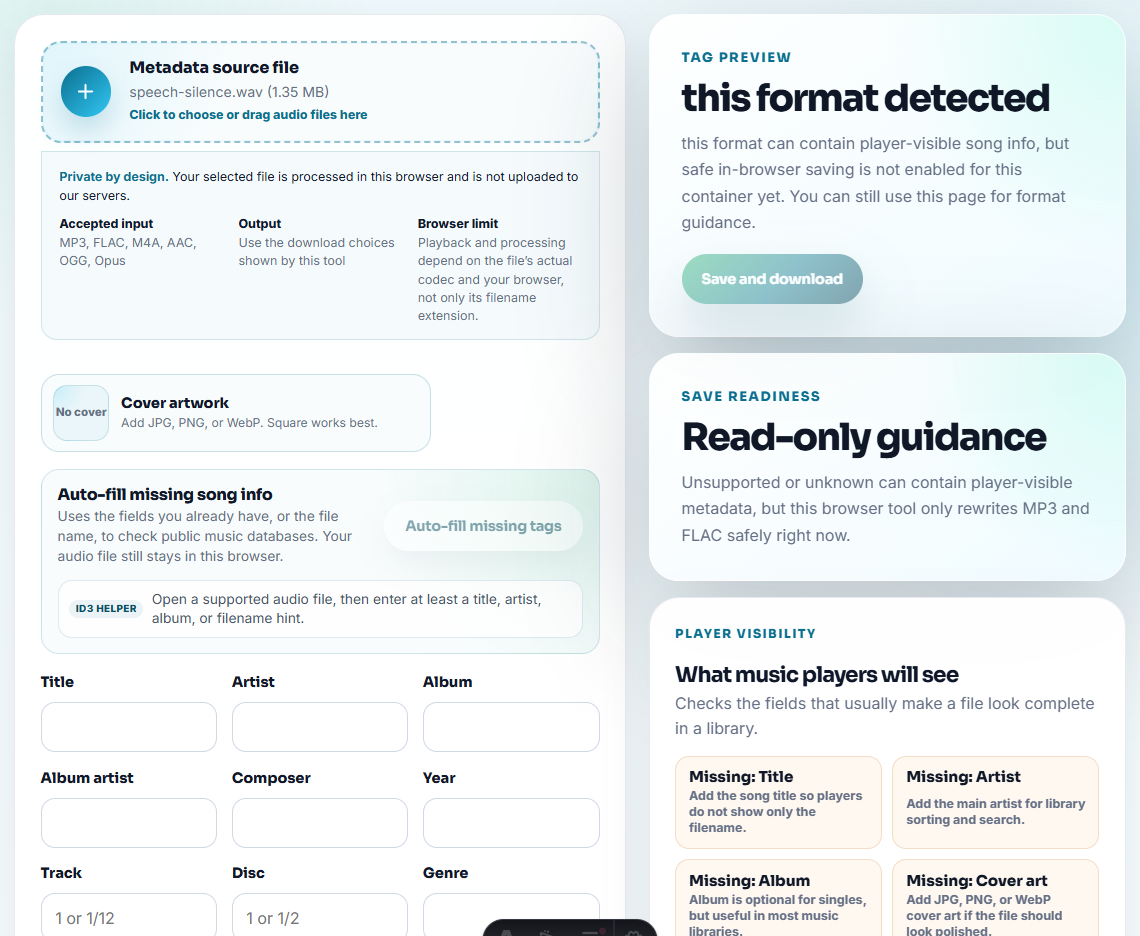
Helpful labels:
- Language.
- Topic.
- Speaker.
- Lesson number.
- Speed version.
- Practice goal.
Example: spanish-lesson-04-slow-dialogue-copy.mp3.
When Browser Prep Is Enough for Language Practice
For language-learning audio, browser tools are enough when you are trimming pauses, grouping phrases, or making a practice copy easier to repeat. Keep pronunciation intact, avoid heavy noise cleanup that blurs consonants, and label files by lesson or phrase.
For recording online lessons or streaming audio repeatedly, Cinch Audio Recorder helps capture the source before you shape practice copies.
Related Fixes and Prep Guides
- Audio Trimmer
- Audio Speed Changer
- Audio Silence Remover
- Audio Normalizer
- Audio Chapter Splitter
- Turn Lecture Recordings Into Study-Friendly Audio
- Make School Submission Audio Clear and Compatible
- Prepare Clear Audio Before Transcription
Checks Worth Making First
What free tools help with language listening practice?
Trim the useful section, slow hard passages, shorten only safe silence, normalize speech, split lessons into parts, and label each practice copy clearly.
Should I remove all pauses from language audio?
No. Keep pauses that help repetition, pronunciation, shadowing, or comprehension. Remove only long dead air that breaks practice flow.
Should I change pitch when slowing language audio?
Usually no. Preserve pitch so voices stay natural and pronunciation practice remains useful.