
How to Fix Audio That Is Louder on One Side
 By HenrikUpdated Aug 7, 20266 min read
Check stereo imbalance, rebalance left and right audio, convert to mono when needed, normalize, and verify playback.
Lopsided audio is tiring. In headphones it pulls your attention to one ear. On speakers it can make vocals feel off-center. In a car or phone speaker, part of the recording may almost disappear.
The fix depends on what the file is. Music may need a gentle stereo balance. Speech may be better as mono. A missing channel is a different problem from a channel that is simply quieter.
Separate Source, Review, and Final Copies
| Stage | Free tool | What it helps you decide |
|---|---|---|
| 1 | Audio Metadata Viewer | Check whether the file is mono, stereo, or another channel layout. |
| 2 | Recording Quality Checker | Look for level and clipping problems before changing channels. |
| 3 | Lopsided Audio Pan Balancer | Recenter stereo when one side is louder but both channels matter. |
| 4 | Stereo to Mono Converter | Combine channels when one-ear or speaker playback is the priority. |
| 5 | Audio Normalizer | Correct final level after balance or mono conversion. |
| 6 | Audio Waveform Generator | Create a quick visual for before-and-after review when helpful. |
Do not start by making everything louder. First decide whether the file should remain stereo.
Step 1: Confirm the Channel Problem
Open the file in the Audio Metadata Viewer and confirm the channel count. If it is already mono, the “lopsided” feeling may come from the playback device, headphones, speakers, or the mix itself.
Then use the Recording Quality Checker and listen to a few sections:
- Is the left side always louder?
- Is the right side missing only in some sections?
- Is voice centered but music wide?
- Is one channel distorted?
- Does the issue happen on another pair of headphones?
This quick check prevents you from changing a file that is not actually the source of the problem.
Choose Pan Balance, Mono, or No Change
The right fix depends on what each channel contains. Do not collapse stereo until you know what would be lost.
| What the channels contain | Better action | Why | Listen for |
|---|---|---|---|
| Same speech in both channels, one side louder | Pan balance or mono copy | Speech clarity matters more than stereo width | Voice stays centered and natural. |
| Music with useful left-right placement | Gentle pan balance | Stereo space is part of the recording | Instruments do not feel pulled to one side. |
| Important voice only on one side | Mono copy or channel correction | One-speaker playback may miss content | No words disappear after conversion. |
| One channel is noise or hum | Review carefully before combining | Mono may add noise to the good side | Noise does not become more prominent. |
| Playback device causes the imbalance | No file edit yet | The file may already be fine | Another headset or speaker plays normally. |
This table helps avoid the common mistake of converting music to mono when a small balance move would have been enough.
Step 2: Keep Stereo When Placement Matters
Use the Lopsided Audio Pan Balancer when both channels still contain useful material and the file should remain stereo.
Good examples:
- A music recording that leans left.
- A stereo interview where both sides are present.
- A live room recording with useful space.
- A captured stream where the whole mix feels shifted.
Make small adjustments and listen again. Over-correcting can make the file feel strange in the other direction.
Step 3: Use Mono When Reliability Matters More
Use the Stereo to Mono Converter when the priority is clear playback everywhere.
Mono is often better for:
- Voice notes.
- Lectures.
- Meetings.
- Accessibility listening.
- One-ear earbud playback.
- Phone speaker playback.
Mono is less ideal for music where stereo placement is part of the experience. For music, try pan balancing first.
Step 4: Normalize After Channel Changes
Balancing or converting to mono can change perceived loudness. Use the Audio Normalizer after the channel decision, not before.
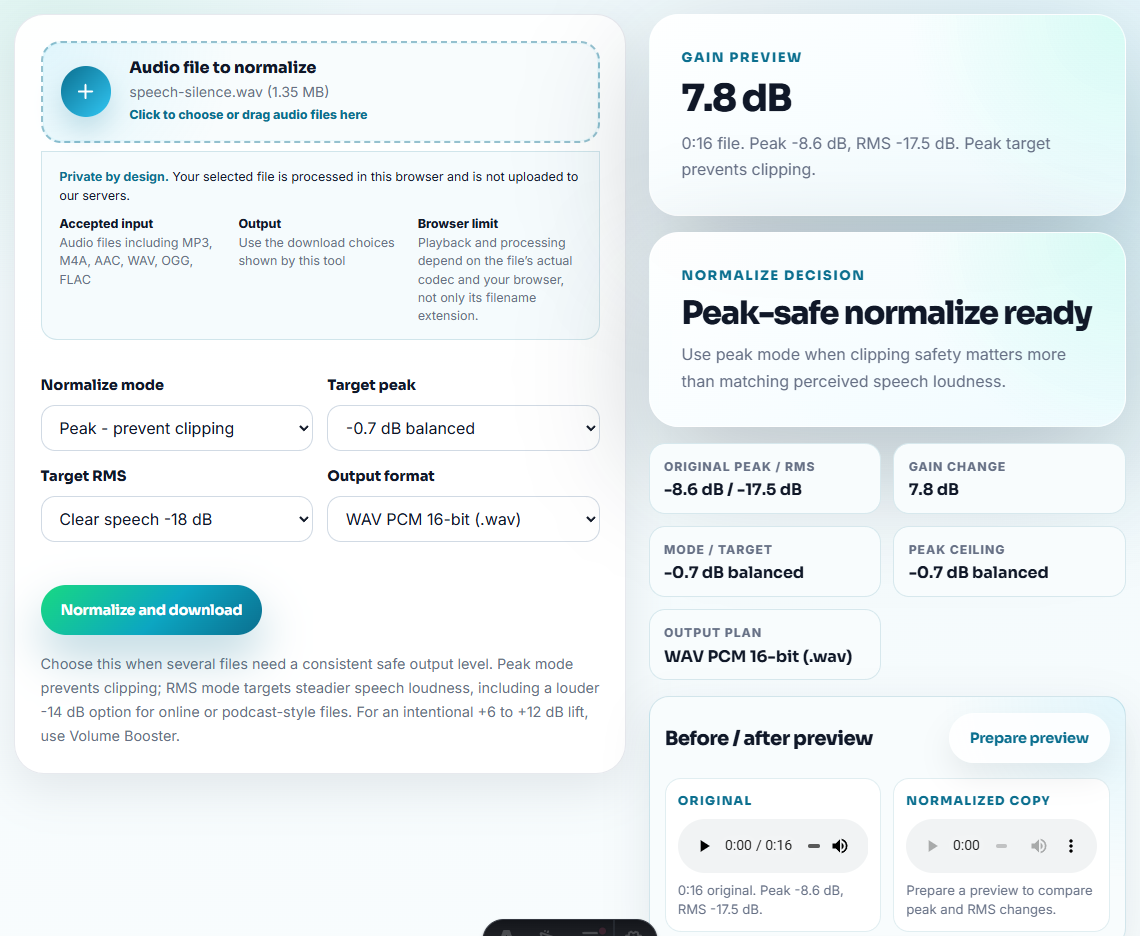
Check that the final file:
- Does not clip.
- Plays comfortably in headphones.
- Still sounds clear on speakers.
- Does not bury speech after conversion.
If it becomes harsh, go back and use less level correction.
Step 5: Make a Visual Only When It Helps
The Audio Waveform Generator can help when you need to explain the issue to a teammate or support person. A before-and-after waveform can show whether one side was much stronger, but your ears still decide the final result.
Do not rely on a picture alone. Always listen.
When Free Browser Tools Are Enough
Browser tools are enough for lopsided stereo when the problem is obvious and the goal is comfortable playback. Check headphones and speakers after export, and keep the original stereo file in case one channel contains detail that should not be blended away.
- One file is leaning left or right.
- Both channels contain usable sound.
- Speech can safely become mono.
- You need a listening copy, not a professional remix.
Use a deeper editing workflow when:
- A channel is damaged or missing important content.
- Music needs careful stereo mastering.
- Multiple microphones need separate treatment.
- The same capture setup repeatedly creates lopsided recordings.
For repeated streaming-audio capture, Cinch Audio Recorder helps by keeping the recording workflow more controlled from the beginning.
Helpful Next Steps
- Lopsided Audio Pan Balancer
- Stereo to Mono Converter
- Recording Quality Checker
- Audio Normalizer
- Audio Waveform Generator
- Clean Rough Recorded Audio Without Overediting
- Make Voice Recordings Clearer Before Sharing
Before You Share the File
How do I fix audio that is louder on one side?
Check the file first, use a pan balancer when stereo should stay stereo, convert to mono when one-ear playback matters more, then normalize and listen again.
Should I convert lopsided stereo to mono?
Use mono when the file is speech, accessibility audio, phone playback, or one-ear listening. Keep stereo for music when the left and right placement matters.
Can a browser workflow repair a missing channel?
They can copy or combine what exists, but they cannot recover content that was never recorded in the missing or damaged channel.